
ASRS system integration is the work of connecting automated storage equipment, warehouse software, control systems, business systems, and operational data into one reliable warehouse process. The robots may look like the center of the project, but the integration layer decides whether orders flow cleanly, inventory stays accurate, and exceptions reach the right team before they become downtime.
Many automation projects do not fail because the shuttle, crane, AGV, or conveyor cannot move. They fail because the ERP sends incomplete master data, the WMS creates work in a pattern the automation cannot execute, the WES has no clear exception rule, or the WCS receives commands that are technically valid but operationally wrong.
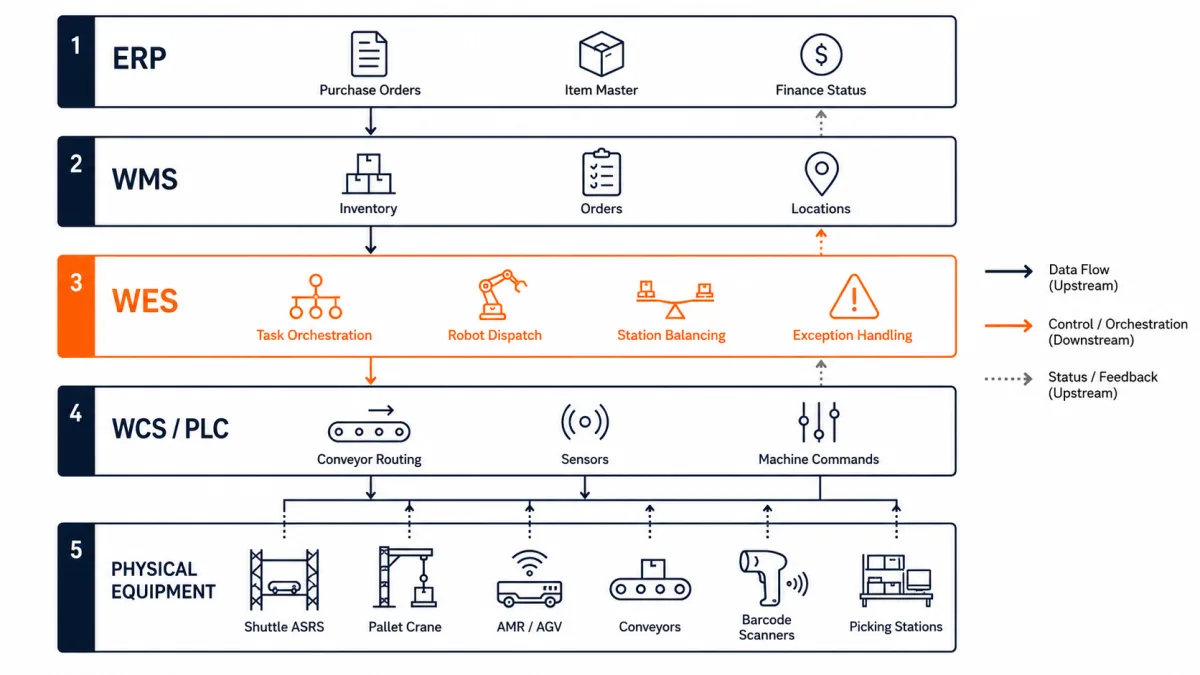
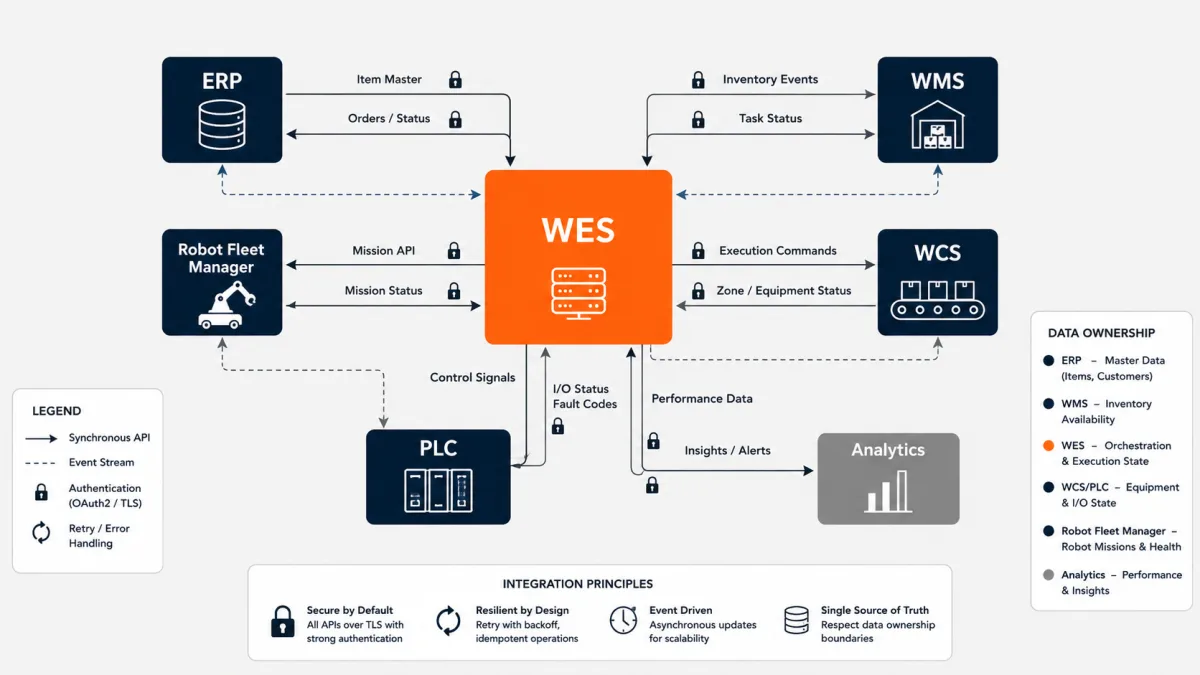
Short answer: ASRS system integration connects five layers: ERP for business data, WMS for inventory and order management, WES for real-time warehouse orchestration, WCS/PLC for machine control, and robots or material handling equipment for physical execution. A good integration plan defines ownership, message timing, failure recovery, inventory truth, testing scope, and support responsibility before equipment arrives on site.
This guide explains how the layers fit together, where integrations break, and what buyers should ask before choosing an ASRS partner.
What ASRS System Integration Actually Means
ASRS system integration means turning several separate systems into one working automation process. It covers technical connectivity, business rules, data ownership, exception handling, user workflows, testing, and post-go-live support.
At a basic level, an automated storage and retrieval system includes equipment and controls that store and retrieve materials with a defined degree of automation. MHI's AS/RS Industry Group describes AS/RS as a combination of equipment and controls that handle, store, and retrieve materials with precision, accuracy, and speed. That definition is useful because it already includes "controls." The software and control layers are not optional add-ons. They are part of the system.
For a simple warehouse, one WMS may send tasks to one automation controller. For a real enterprise site, the structure is usually more complex:
| Layer | Main role | Typical integration concern |
|---|---|---|
| ERP | Finance, procurement, sales orders, item master, production orders | Master data quality, business status, inventory valuation |
| WMS | Inventory, receiving, picking, replenishment, shipping | Order release, allocation, stock location, exception codes |
| WES | Task orchestration across ASRS, AMR, conveyor, stations, labor | Priority logic, workload balancing, equipment assignment |
| WCS | Machine-level command translation and routing | Conveyor zones, crane commands, shuttle missions, fault states |
| PLC/device | Real-time control of equipment and safety devices | Signal timing, interlocks, sensors, emergency stop states |
The exact split varies by vendor. Some WMS platforms include light WES functions. Some WCS vendors include routing logic. Some robot vendors provide their own fleet manager. The important question is not what each layer is called. The important question is who owns each decision.
For the broader software-layer distinction, see our WES vs WMS vs WCS guide.
Why Integration Is Harder Than It Looks
The hard part is not sending a message from one system to another. The hard part is preserving operational meaning as that message moves across systems with different clocks, assumptions, and responsibilities.
ERP systems think in business objects: purchase orders, sales orders, production orders, invoices, suppliers, customers, and item master data. WMS systems think in warehouse objects: pallets, cartons, bins, locations, lots, holds, waves, tasks, and shipments. WES systems think in execution objects: queues, robot missions, station loads, congestion, cut-off time, and equipment status. WCS and PLCs think in signals, routes, motors, sensors, and safety states.
An ASRS project breaks when those objects are mapped casually.
Common examples:
- The ERP item master says an SKU can be stored in any tote, but the ASRS bin size rule rejects it.
- The WMS releases a large wave, but the picking stations do not have enough capacity to absorb the work.
- A robot fleet completes retrieval tasks, but the WMS receives inventory updates late and blocks the next order.
- The WCS reports a conveyor fault, but the WES has no rule for rerouting work to a different station.
- A manual override fixes a production issue, but the change is not written back to the inventory system.
These are not rare edge cases. They are normal warehouse events. Integration design decides whether they are routine exceptions or expensive interruptions.
The Integration Layer Buyers Usually Miss
Many buyers evaluate ASRS through equipment categories: shuttle ASRS, mini-load ASRS, pallet ASRS, AMR, AGV, conveyor, workstations, and sorters. Equipment selection matters, but the hidden project risk often sits between the equipment and the business system.
That middle layer is usually WES.
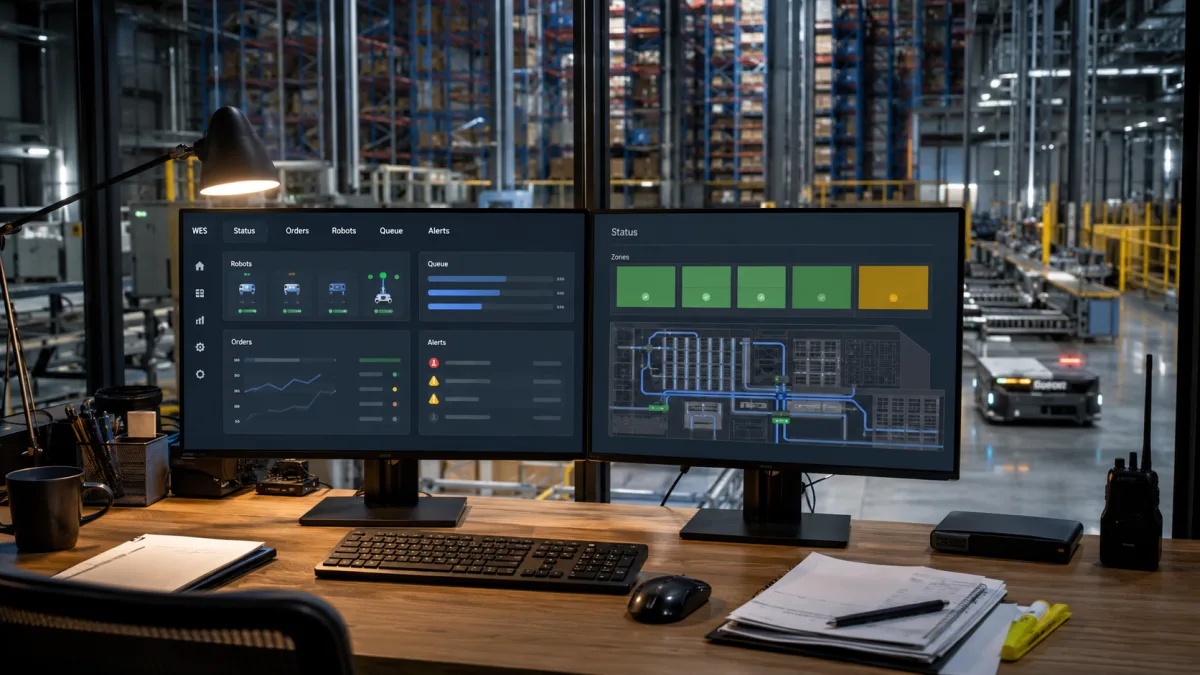
A WES software platform sits between planning and machine control. It receives inventory, orders, and priorities from business systems, then translates them into executable work across robots, stations, conveyors, lifts, and people.
For GoASRS, this layer is central because we work as a logistics integrator, not as a single-device manufacturer. A warehouse may use bin robots from one vendor, AGVs from another, conveyors from another supplier, and an existing ERP or WMS that the customer does not want to replace. The WES layer gives the project one orchestration point instead of forcing every system to talk directly to every other system.
That is the difference between a connected warehouse and a patchwork warehouse.
The Five Questions That Define Integration Scope
A buyer does not need to know every API field on day one. The buyer does need clear answers to five questions.
- Which system is the source of truth for inventory?
In most projects, the WMS or ERP owns official inventory. The WES may hold real-time execution state, but it should not become an undocumented second inventory system.
- Which system decides work priority?
Order priority may originate in ERP, wave planning may sit in WMS, and real-time sequence may sit in WES. These rules need a hierarchy.
- Which system can stop, reroute, or release work?
Automation needs safe stop rules. Operations also need business stop rules, such as customer hold, quality hold, lot recall, or shipment cutoff.
- Which events must be written back?
Putaway complete, retrieval complete, pick complete, short pick, exception, station full, robot fault, and inventory adjustment should be defined before testing.
- Who owns support when the issue crosses layers?
"The robot vendor says it is WMS" and "the WMS vendor says it is controls" is not a support model. One integrator should own the end-to-end incident path.
If these questions are vague in the proposal, the integration scope is not ready.
ERP Integration: Master Data and Business Commitments
ERP integration usually sits above daily warehouse execution, but it can still decide whether the ASRS works cleanly. The ERP owns many of the facts that downstream systems rely on.
Typical ERP data includes:
- Item master, UOM, dimensions, weight, shelf-life, lot rules, and handling class
- Purchase orders, production orders, transfer orders, sales orders, and returns
- Customer priority, shipping promise, allocation status, and finance status
- Supplier, customer, plant, storage location, and business unit mapping
The ASRS does not need to know every finance field. It does need clean operational attributes. If a tote automation system does not receive item dimensions, weight class, lot control, or stackability rules, the downstream system must guess. Guessing creates rework.
The best ERP integration pattern is selective. Send the warehouse the fields it needs, validate them early, and reject incomplete records before they reach automation.
For manufacturing and semiconductor sites, ERP integration also touches production flow. A WIP material request may come from MES or ERP, move through WES, execute through AGVs or ASRS, then report back as line-side delivery. That workflow needs stronger traceability than a simple outbound pick.
WMS Integration: Inventory, Orders, and Warehouse Logic
The WMS usually owns warehouse inventory and order management. It decides what stock exists, where it sits, which orders need work, and which warehouse transactions are complete.
ASRS integration with WMS should define both inbound and outbound flows.
Inbound examples:
- Receiving advice
- Tote or pallet induction
- Putaway request
- Quality hold release
- Replenishment into automated storage
Outbound examples:
- Order release
- Pick task request
- Case or tote retrieval
- Goods-to-person station assignment
- Shipment confirmation
The tricky part is timing. A manual warehouse may tolerate delayed updates because a worker can check a screen or scan a label. A high-throughput automated warehouse cannot rely on loose timing. If a retrieval confirmation arrives late, the next station may wait. If the WMS releases too much work at once, the ASRS buffer may choke. If inventory adjustment rules are unclear, the WMS and WES may disagree about what is physically available.
For order-heavy sites, such as e-commerce and 3PL, WMS integration must also handle volatility. See our guides on ASRS for e-commerce fulfillment and ASRS for 3PL warehouses for the operational side of this problem.
WES Integration: The Orchestration Layer
WES integration is where warehouse logic becomes executable work. It is the layer that decides what should happen now, not just what should happen eventually.
A WES may receive an order from WMS, split it into tasks, assign those tasks to a shuttle system, choose a picking station, sequence tote delivery, balance workload, reroute around equipment faults, and report completion back to the WMS. In a mixed automation site, it may also coordinate AMRs, conveyors, elevators, pallet ASRS, manual zones, and packing areas.
This is why WES matters for multi-vendor automation. Without WES, each equipment island may run well by itself but compete for labor, stations, space, and priority. A shuttle system may retrieve faster than operators can pick. AGVs may arrive at a station with no dock capacity. Conveyors may push work into a congested sorter. The site looks automated, but throughput becomes unstable.
GoASRS places WES at the center of system integration because it gives the warehouse a single execution brain. The goal is not to replace ERP or WMS. The goal is to keep business planning, inventory management, execution control, and machine control in the right layers.
For the physical process view, read How Does an ASRS System Work?.
WCS, PLC, and Robot Fleet Integration
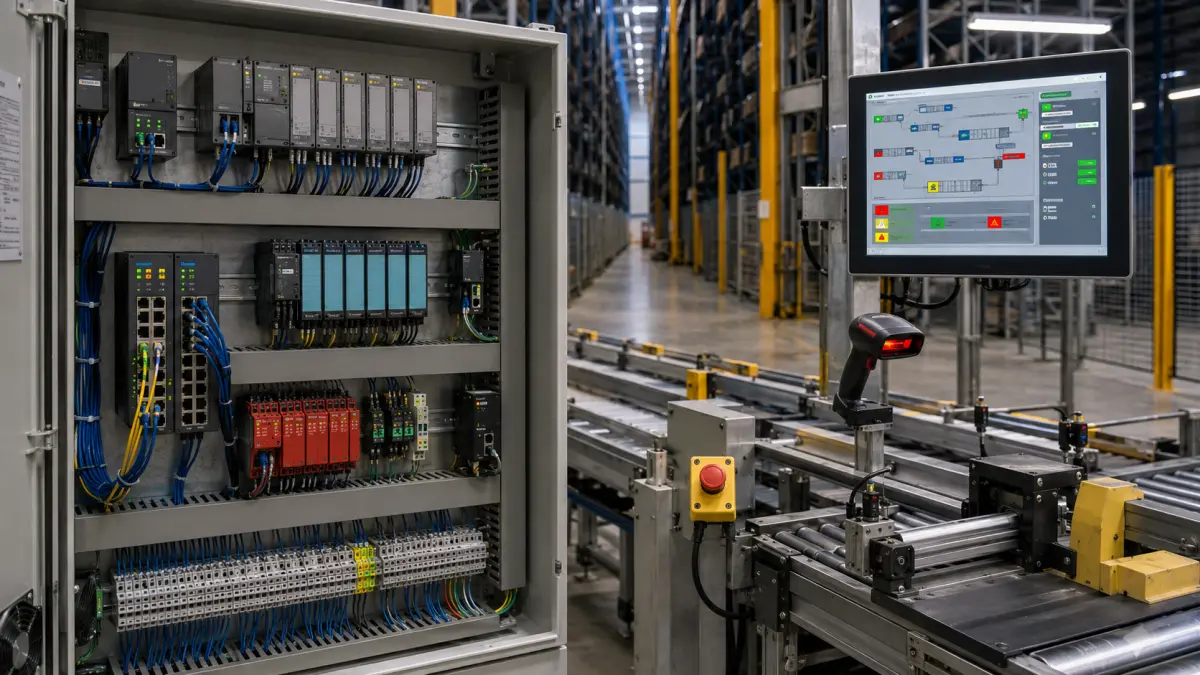
WCS and PLC integration brings the project closer to the physical machine. This layer is less forgiving than ERP or WMS integration because it deals with equipment states, safety devices, conveyors, sensors, motors, and real-time commands.
Typical WCS and PLC integration points include:
- Conveyor zone availability
- Crane or shuttle mission commands
- Lift and transfer status
- Barcode or RFID read results
- Divert confirmation
- Emergency stop and safety interlock status
- Fault codes and recovery commands
- Manual mode and maintenance mode states
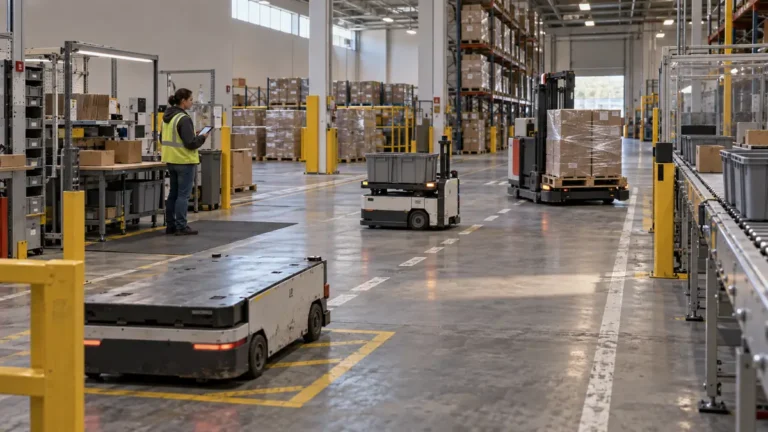
Robot fleets add another layer. AMR or AGV fleet managers may expose mission APIs, map status, charging status, blocked-path alerts, and robot health data. The WES should not micromanage every motor command. It should request a mission, receive status, handle exceptions, and coordinate the mission with the rest of the warehouse.
For industrial connectivity, many sites use vendor APIs, message queues, fieldbus protocols, OPC UA, or direct PLC interfaces depending on the equipment and control architecture. OPC Foundation describes OPC UA as an open-platform architecture for industrial information exchange, which is why it appears in many automation discussions. The exact method should match the controls environment, not a sales preference.
The project team should document this boundary carefully. If WES owns business priority and WCS owns machine routing, the handoff must be explicit. If the robot fleet manager owns path planning, WES should not issue conflicting route logic.
Event Data: The Missing Integration Design
Many integration documents list messages but do not define events. That is a problem.
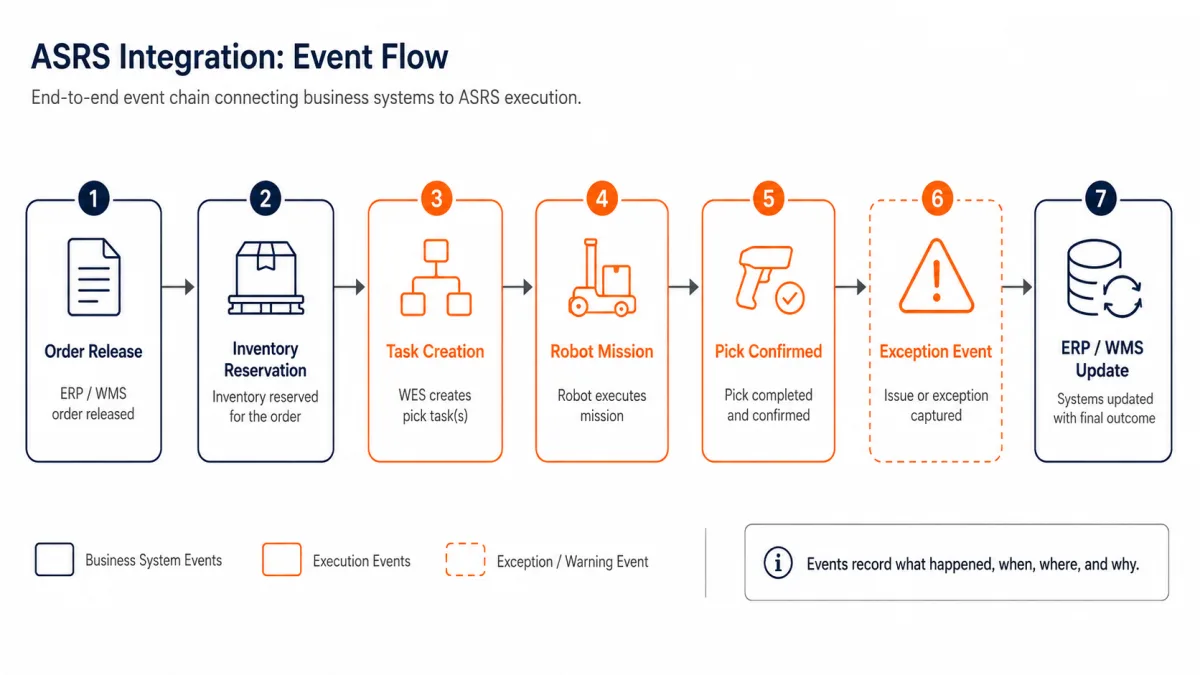
A message is a technical packet. An event is a business fact that something happened. ASRS projects need both. The message tells a system what to do or what happened. The event tells the warehouse what that means.
Useful ASRS events include:
| Event | Business meaning |
|---|---|
| Tote inducted | Physical container accepted into automation |
| Storage complete | Inventory is available in automated storage |
| Retrieval complete | Container has reached the requested output point |
| Pick confirmed | Ordered quantity was picked and confirmed |
| Short pick | Expected quantity was not available or not usable |
| Exception raised | Work cannot continue without rule-based recovery |
| Equipment fault | Machine status affects execution capacity |
GS1 EPCIS is relevant here because it is a visibility data standard for capturing and sharing supply chain event data. You do not need to implement EPCIS in every ASRS project. You do need the same discipline: define what happened, when it happened, where it happened, what object was involved, and why the event matters.
Event discipline becomes critical for regulated, cold-chain, semiconductor, and multi-client warehouses. In a cold storage ASRS, a delayed door event or location mismatch can affect product condition and energy use. In a semiconductor warehouse like the CCMC case study, traceability and process state matter as much as movement.
Common Integration Patterns
There is no one correct integration method. There is a correct method for the site's systems, throughput, support model, and risk profile.
| Pattern | Best fit | Risk to manage |
|---|---|---|
| REST API | Modern ERP/WMS/WES integrations with clear transactions | Version control, retry rules, authentication |
| Message queue | High-volume events and decoupled systems | Event order, dead-letter handling, monitoring |
| Flat file or SFTP | Legacy ERP or batch-based WMS | Latency, duplicate files, reconciliation |
| Database view | Reporting or low-risk read-only access | Tight coupling, ownership, performance |
| OPC UA or controls interface | PLC, WCS, and industrial equipment state | Tag naming, signal timing, safety boundary |
The best integrations also define what happens when the method fails. A good API integration includes retries, idempotency, error codes, and monitoring. A good file integration includes archive folders, duplicate detection, validation, and alerting. A good controls integration includes fault recovery and safe manual mode.
An integration design without failure behavior is incomplete.
Example Workflow: From ERP Order to Robot Movement
Here is a simplified outbound order workflow.
- ERP releases a customer order or production requirement.
- WMS allocates inventory and creates warehouse work.
- WES sequences work by priority, station capacity, equipment status, and cutoff time.
- WCS or robot fleet manager executes retrieval, routing, and station delivery.
- WMS receives completion, updates inventory, and reports status back to ERP.
This looks linear, but the live process is not always linear. A tote may be blocked. A scanner may reject a label. A station may go down. An operator may confirm a shortage. A customer priority may change after work is already released.
The integration plan should define these branches. If not, every exception becomes a manual meeting.
Testing ASRS Integration Before Go-Live
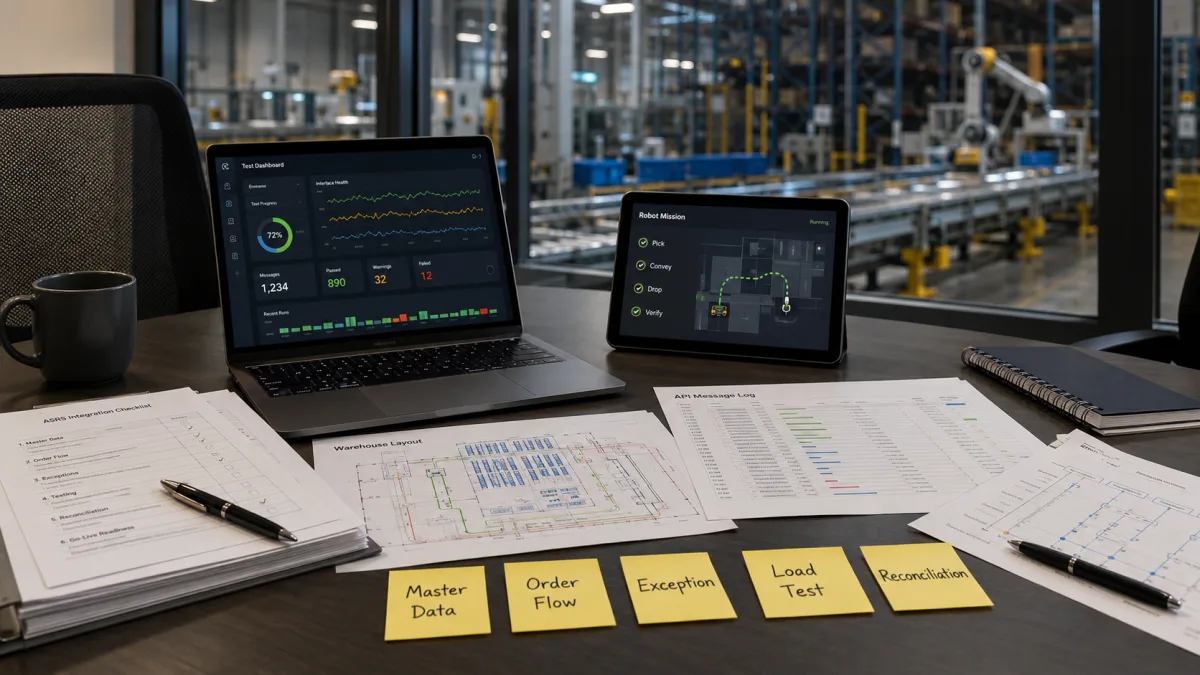
Integration testing should start before the warehouse is full of steel, robots, and live orders. The best projects test message logic, event flow, and exception handling early.
A practical test plan should cover:
| Test area | What to prove |
|---|---|
| Master data | Item, location, UOM, lot, weight, dimension, and handling rules are accepted or rejected correctly |
| Transaction flow | Receiving, putaway, retrieval, picking, replenishment, and shipment updates move across systems |
| Exception handling | Short pick, blocked tote, duplicate scan, equipment fault, and manual override have defined recovery |
| Load behavior | The system can handle expected order release patterns without station or buffer congestion |
| Reconciliation | Physical inventory, WES execution state, and WMS inventory can be compared and corrected |
Testing should include negative cases. A perfect happy-path demo proves very little. The real test is whether the warehouse recovers cleanly when a tote is missing, a label scan fails, an ERP record is incomplete, or a conveyor zone is unavailable.
The test team should also include operations. IT can verify the message. Controls engineers can verify the signal. Operations must verify the workflow.
Cybersecurity and Access Control
ASRS integration connects IT systems, OT systems, and vendor support channels. That makes security part of integration, not a separate final checklist.
At minimum, buyers should define:
- Which systems can call which APIs
- Which vendor accounts can access production systems
- How remote support sessions are approved and logged
- Where credentials and certificates are stored
- Which network zones separate ERP, WMS, WES, WCS, PLC, and devices
The practical goal is simple: give each system enough access to do its job, and no more. For warehouse automation, this matters because a bad integration credential can affect physical movement, not only data.
Security also affects support. If a fault happens at 2 a.m., the support path must be secure and usable. A policy that blocks all remote diagnosis may protect the network but lengthen downtime. A policy that gives every vendor broad access creates a different risk. The right answer is controlled access with logs, approval, and clear ownership.
How Integration Changes by ASRS Type
Different ASRS types create different integration pressure.
| System type | Integration focus |
|---|---|
| Pallet ASRS | ERP/WMS inventory accuracy, pallet ID, dock flow, forklift or conveyor handoff |
| Mini-load ASRS | Tote ID, bin location, picking stations, replenishment rules, order sequencing |
| Shuttle ASRS | High-volume retrieval sequencing, buffer logic, station balancing, wave control |
| AMR/AGV goods-to-person | Fleet mission APIs, map status, station dock capacity, charging rules |
| Conveyor and sorter | WCS routing, scanner reads, divert confirmation, jam recovery |
For system selection, start with How to Choose ASRS System and ASRS Warehouse: Systems, Layouts & Automation Examples. The integration architecture should follow the operating model, not the other way around.
Integration Cost and Ownership
Integration cost is often underestimated because it does not look like equipment. It appears as workshops, mapping documents, API development, PLC work, testing, site acceptance, user training, go-live support, and support handover.
This cost is not waste. It is what turns hardware into a working system.
A low integration budget usually creates one of three outcomes:
- Scope gets pushed to the customer's IT team without enough warehouse context.
- Exception handling is removed from go-live scope and handled manually later.
- Vendors integrate only their own layer, leaving cross-system issues unresolved.
That is why ASRS buyers should treat integration as a named line item, not a hidden assumption. Our ASRS total cost of ownership guide explains how integration, software, support, and downtime risk affect the 5- to 10-year cost model.
What to Ask an ASRS Integration Partner
A good integration partner should be comfortable answering operational questions, not only technical ones.
Ask these before signing:
| Question | Why it matters |
|---|---|
| Which system owns inventory truth at each step? | Prevents hidden duplicate inventory states |
| What are the exact inbound and outbound events? | Prevents vague API scope |
| How do you handle failed messages and duplicates? | Reduces manual recovery work |
| Who owns cross-vendor incidents after go-live? | Avoids support deadlocks |
| Can you test with our real order and SKU patterns? | Finds problems before live operations |
| How does WES prioritize work during peak periods? | Protects throughput under stress |
| What happens if one subsystem goes down? | Defines fallback and recovery |
If the answers are generic, keep digging. A warehouse automation proposal should include an integration architecture, message/event list, acceptance criteria, and support model.
GoASRS has deployed and integrated more than 6,000 robots across 50+ enterprise customers. The lesson is consistent: hardware capability matters, but integration quality decides whether the system becomes a dependable warehouse process.
Signs Your Integration Plan Is Too Weak
Integration risk is visible early if you know what to look for.
Red flags include:
- The proposal lists "API integration" but no message list.
- The vendor cannot explain where inventory truth sits.
- ERP, WMS, WES, and WCS responsibilities overlap without a decision matrix.
- Testing focuses on demos, not exception cases.
- Manual override rules are not documented.
- Vendor support stops at each company's product boundary.
- Go-live success is defined as "system installed," not "orders shipped through automation."
These red flags do not always mean the project is wrong. They mean the integration scope needs work before purchase order approval.
A Practical Integration Blueprint
For most ASRS projects, the safest blueprint is layered, event-driven, and owned by one lead integrator.
Use ERP for enterprise commitments. Use WMS for inventory and warehouse transactions. Use WES for execution orchestration. Use WCS for machine routing and control translation. Use PLCs and device controllers for physical safety and motion. Use event logs to reconcile what happened.
That architecture does not remove complexity. It makes complexity visible and manageable.
It also keeps the warehouse flexible. If the site adds another robot fleet, a new picking area, a packing line, or a production-side delivery flow, the WES layer can absorb the new execution logic without forcing the ERP or WMS to control every physical detail.
For multi-vendor sites, that flexibility is often the difference between a scalable automation platform and a one-time equipment installation.
Frequently Asked Questions
What is ASRS system integration?
ASRS system integration is the connection of automated storage equipment, WES, WMS, WCS, ERP, PLCs, scanners, conveyors, and operational data into one working warehouse process. It defines data ownership, task flow, machine commands, event reporting, exception handling, testing, and support.
Do I need WES if I already have WMS?
You may not need a separate WES for a simple automated zone. You usually need WES when the warehouse has multiple automation types, multiple stations, high order volatility, or real-time workload balancing requirements. WMS manages inventory and orders; WES controls execution priority across equipment and people.
Can ASRS connect directly to ERP?
It can in narrow use cases, but direct ERP-to-equipment integration is usually too rigid for a live warehouse. ERP is strong at business records. It is not designed to manage second-by-second equipment state, station load, conveyor faults, robot missions, or pick exceptions. Most sites need WMS/WES/WCS layers between ERP and equipment.
What data is needed for ASRS integration?
Common data includes item master, UOM, dimensions, weight, lot rules, location master, container IDs, order lines, inventory reservations, task status, pick confirmations, equipment status, exception codes, and shipment confirmations. The exact list depends on system type and operating model.
How long does ASRS integration take?
The timeline depends on the number of systems, API quality, master data condition, testing depth, and site complexity. A straightforward single-zone integration can be much faster than a multi-vendor warehouse with ERP, WMS, WES, WCS, conveyors, AMRs, and production-side material flow. The integration timeline should be planned during solution design, not after equipment installation.
What is the biggest ASRS integration risk?
The biggest risk is unclear ownership between systems. If no one defines which system owns inventory truth, work priority, exception recovery, and support responsibility, the warehouse may work during demos but fail under live order pressure. Clear boundaries reduce that risk.
Who should own ASRS system integration?
One lead integrator should own the end-to-end integration outcome, even if ERP, WMS, WCS, robot fleet, and PLC work comes from different vendors. Without a lead owner, cross-system incidents can become vendor disputes instead of operational fixes.
Bottom Line
ASRS system integration is not a back-office IT task. It is the architecture that connects business promises to physical warehouse movement.
The buyer should evaluate integration as seriously as equipment. A strong ASRS integration plan defines system ownership, event flow, WES orchestration, WMS/ERP boundaries, WCS and PLC handoff, exception handling, testing, security, and support. If those pieces are clear before go-live, automation becomes a reliable operating system for the warehouse. If they are vague, the warehouse inherits the complexity after the project team leaves.
For projects with multiple automation types, start with the integration architecture before final equipment selection. That is where hidden risk, hidden cost, and long-term flexibility are decided.