
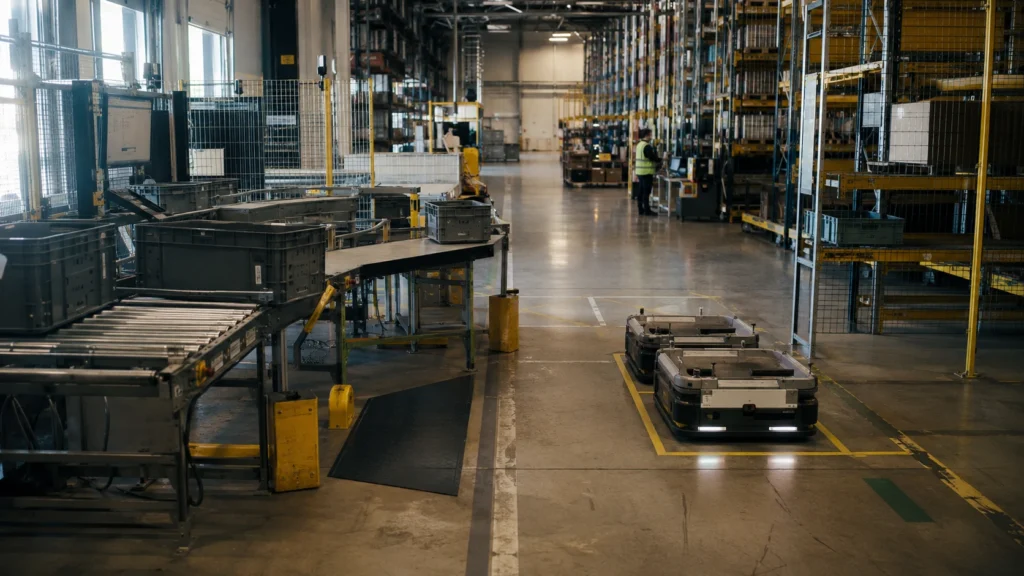
WES software coordinates the work happening inside an automated warehouse right now. It takes orders, priorities, inventory availability, equipment status, labor capacity, and downstream constraints, then turns them into an executable flow across people, robots, conveyors, ASRS equipment, and workstations.
That sounds simple until several systems need the same aisle, station, buffer, or shipping cutoff at once. A WMS may know which orders must ship. A robot controller may know how to move a tote. Neither necessarily decides which task should run next across the entire operation. That is the problem a warehouse execution system is designed to solve.
Short answer: WES software is a real-time warehouse orchestration layer. It typically sits between a WMS, which manages inventory and orders, and WCS or equipment controllers, which command machines. A WES prioritizes and releases work, allocates tasks, balances flow, coordinates automation, monitors exceptions, and reports execution results. Exact modules vary by vendor.
This guide explains what warehouse execution software does, where its responsibilities begin and end, which modules buyers should evaluate, how WES integrations work, and why credible WES pricing requires a project-specific scope rather than a generic price range.
WES Software at a Glance
- Primary role: Convert warehouse priorities into continuously updated execution decisions.
- Typical position: Between WMS planning and WCS or equipment-level control.
- Core value: Keep labor, automation, buffers, and downstream stations working as one flow instead of separate islands.
- Common modules: Order release, task orchestration, resource allocation, automation integration, exception management, dashboards, and analytics.
- Best fit: Complex sites with multiple automation zones, mixed manual and automated work, volatile order priorities, or shared bottlenecks.
- Important caveat: WES is not a universal product specification. Some platforms are standalone, some are embedded in WMS, and some include selected WMS or WCS functions.
- Pricing reality: Most WES projects are quote-based because interfaces, testing, commissioning, support, and operating complexity materially affect total cost.
What Is WES Software?
A warehouse execution system is software that converts warehouse priorities into real-time work decisions across people and automation. It receives information about orders, inventory, deadlines, resources, queues, and equipment availability; decides what should happen next; and keeps adjusting as conditions change.
Official industry and vendor materials describe the same broad responsibility from different angles. An MHI-hosted warehouse software paper describes WES capabilities such as dynamic task allocation, order prioritization, workflow adaptation, and orchestration of automation. Dematic describes execution software that sequences and releases work according to priority, resource availability, and downstream capacity. Honeywell emphasizes real-time coordination across human and automated resources.
These descriptions are useful, but they do not create a universal boundary. A WES may be:
- A standalone orchestration layer connected to an existing WMS and several automation systems.
- A module embedded inside a broader WMS platform.
- A unified execution suite that includes selected WMS and WCS capabilities.
- An automation-vendor platform optimized around one equipment ecosystem.
The product name alone is therefore not enough. Buyers need a responsibility matrix showing which system owns inventory, order priority, task release, routing, equipment commands, exception recovery, and reporting.
WES vs WMS vs WCS: What Is the Difference?
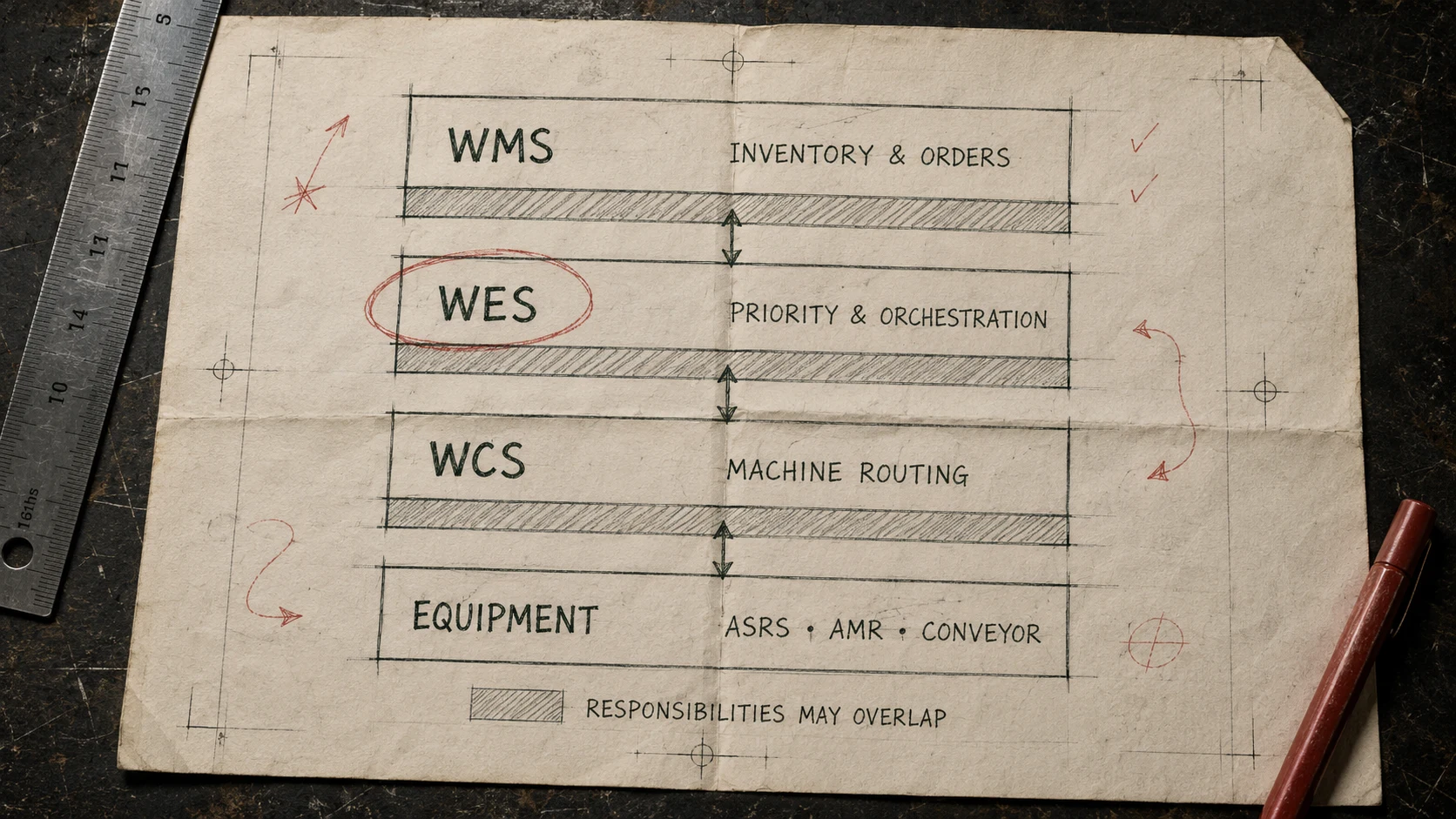
WMS manages warehouse information, WES orchestrates warehouse execution, and WCS controls material-handling equipment. This three-layer model is a useful starting point, but real products can overlap.
| Question | WMS | WES | WCS or equipment controller |
|---|---|---|---|
| What is its primary job? | Manage inventory, orders, locations, and warehouse rules | Decide what work should run next across resources | Translate work into equipment-specific commands |
| What does it optimize? | Inventory accuracy and order fulfillment planning | End-to-end flow, priority, capacity, and resource utilization | Movement inside a machine or automation zone |
| Typical decision horizon | Minutes to shifts | Seconds to minutes | Milliseconds to seconds |
| Typical inputs | Orders, inventory, master data, receiving and shipping rules | Priorities, due times, queues, labor and equipment state | Routes, missions, sensor states, PLC signals |
| Typical outputs | Allocations, waves, warehouse tasks | Sequenced work, resource assignments, rerouting, exceptions | Conveyor diverts, shuttle missions, crane or robot commands |
| System of record for inventory? | Usually | Usually not | No |
| Direct machine control? | Usually not | Sometimes through integrated control modules | Yes |
The phrase “WES sits between WMS and WCS” should be treated as a logical model, not a mandatory architecture. Manhattan Associates, for example, presents WES capabilities within its warehouse management platform. Dematic offers both WES and WCS functions. SAP documents automated environments in which EWM retains stock and warehouse-task responsibilities while an external system controls product flow and resource optimization.
For a dedicated comparison, read WES vs WMS vs WCS. The practical buyer question is not “Which acronym do we need?” It is “Which system makes each decision, and what happens when systems disagree?”
What Does WES Software Actually Do?
WES software keeps warehouse work aligned with current conditions. Instead of releasing a large batch and leaving downstream systems to absorb it, a WES can continuously evaluate priorities, capacity, and constraints before releasing or redirecting work.
Consider an e-commerce warehouse approaching a carrier cutoff. Several hundred priority orders remain open. One goods-to-person station is paused, a packing lane is nearly full, and an AMR zone has spare capacity. A WES can use those conditions to slow releases into the constrained packing lane, redirect eligible work, prioritize orders near cutoff, and keep replenishment from starving fast-moving SKUs.
That does not mean WES creates unlimited throughput. It cannot make a full sorter accept more cartons or make an undersized packing area disappear. Its role is to use available capacity more intelligently and prevent avoidable starvation, overload, and sequencing conflicts.
1. Order Prioritization and Dynamic Release
A WES can evaluate due time, customer SLA, carrier cutoff, order type, inventory readiness, consolidation requirements, and resource availability before releasing work. This may support traditional waves, continuous release, or a hybrid approach.
Dynamic release matters because work launched too early can become congestion. A shuttle system may retrieve totes faster than operators can process them. A conveyor may deliver cartons faster than packing can close them. Good execution logic releases work at a rate the whole system can absorb.
2. Task Creation, Sequencing, and Allocation
The WES converts demand into executable tasks and determines their sequence. Tasks may include retrieval, put-away, replenishment, picking, transport, consolidation, packing, labeling, quality checks, or sortation.
Allocation may consider:
- Order urgency and service commitment
- Inventory and container availability
- Robot, shuttle, crane, or conveyor state
- Station queue depth and operator capacity
- Travel distance and zone congestion
- Battery or charging state for mobile robots
- Replenishment dependencies
- Consolidation requirements for multi-line orders
The exact optimization logic varies by product and project. Buyers should request a demonstration using their own order profile rather than accepting a generic “AI optimization” claim.
3. Cross-Zone Flow Balancing
Warehouse throughput is limited by the slowest active constraint, not the fastest machine. WES software can monitor upstream and downstream capacity so one zone does not flood another.
Typical examples include:
- Holding tote retrieval when pick-station buffers are full
- Advancing replenishment before a high-priority wave is starved
- Balancing work across several picking or packing stations
- Redirecting eligible tasks when equipment or a zone is unavailable
- Sequencing items so multi-zone orders reach consolidation together
- Protecting shipping cutoffs without starving routine work
This is especially valuable in peak-season warehouse automation, where order mix and workload can change faster than static plans.
4. Human and Automation Coordination
Many automated warehouses are hybrid operations. ASRS, conveyors, mobile robots, scanners, pick-to-light, voice systems, and manual exception stations may all participate in one order.
WES software can assign work to the appropriate resource and coordinate the handoffs between them. Honeywell's official materials, for example, describe connections to material-handling equipment, voice, labor systems, AMRs/AGVs, scanners, and machine controls. The goal is not to replace every subsystem; it is to make their operating states visible to the layer responsible for end-to-end execution.
5. Exception Management and Recovery
Automation makes exception design more important, not less. A WES may need rules for short picks, unreadable barcodes, blocked routes, full stations, inventory mismatches, equipment faults, order cancellation, quality holds, or lost communication.
A credible exception module should answer four questions:
- How is the exception detected and classified?
- Which work can continue safely?
- Who receives the alert and what action can they take?
- How are inventory and task states reconciled afterward?
“The system raises an alarm” is not a complete recovery design. The proposal should include degraded modes, retry and replay rules, manual recovery, and post-recovery reconciliation.
6. Real-Time Visibility and Analytics
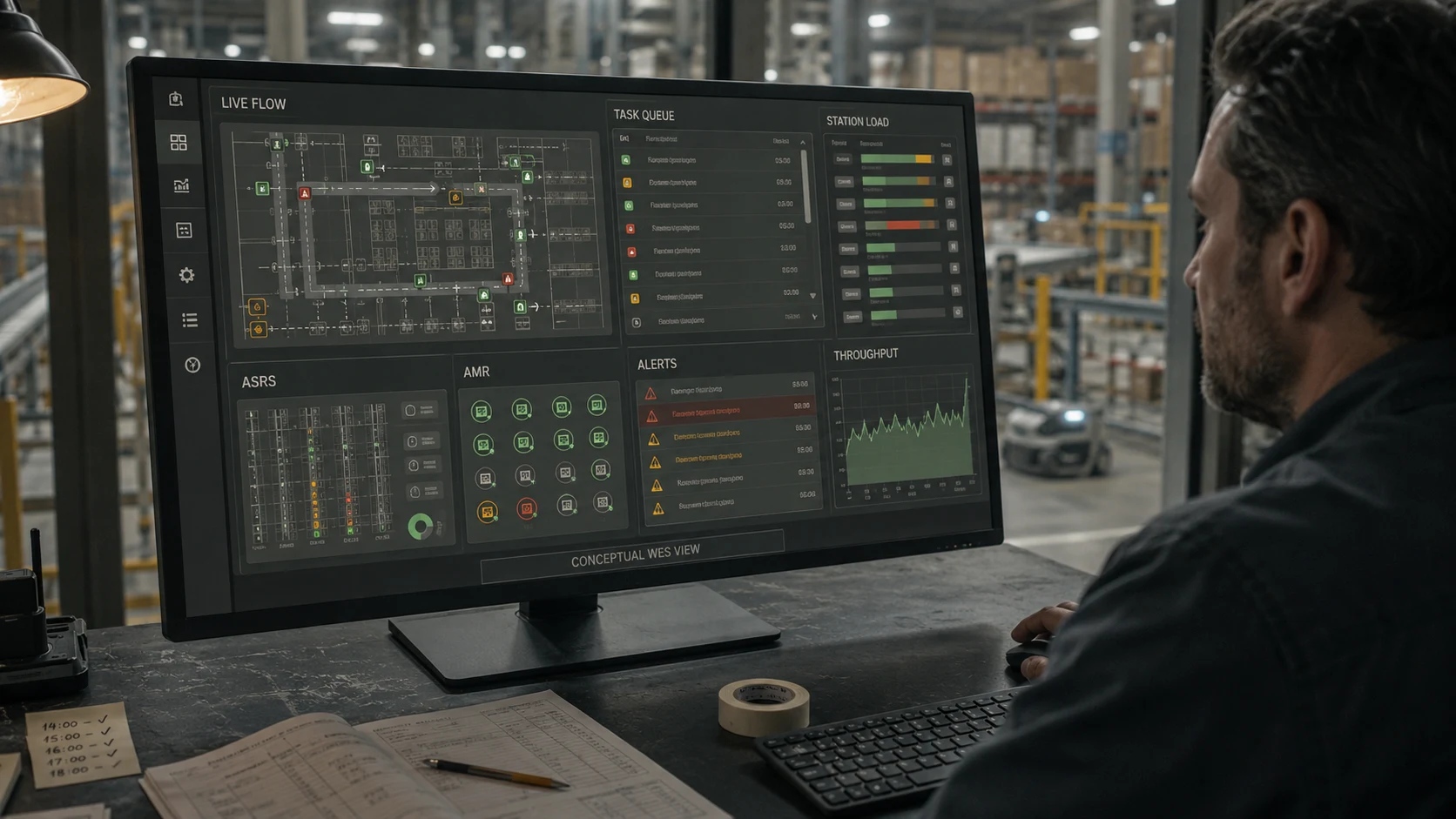
WES dashboards commonly present task queues, throughput, station status, resource availability, alarms, backlog, and equipment data. Their most useful function is operational decision support: showing where work is accumulating, which SLA is at risk, and what constraint is causing it.
Analytics should distinguish symptoms from causes. A growing queue is a symptom. The cause may be a station pause, missing replenishment, poor order sequencing, a downstream limit, or inaccurate master data. Buyers should evaluate whether the platform only visualizes activity or also helps operators trace and resolve the constraint.
Which WES Modules Should Buyers Evaluate?
There is no standard module checklist shared by every WES vendor. MHI's SLAM 101 illustrates how broad the possible scope can become, including order management, picking, replenishment, routing, quality, packing, labeling, and manifesting.
Use the following table as a procurement framework, not as a claim that every platform must include every function.
| Module or capability | What to verify | Common scope trap |
|---|---|---|
| Order release and prioritization | Waves, continuous release, cutoff and SLA rules | “Dynamic” release may require custom rules |
| Task orchestration | Task types, dependencies, sequencing, reassignment | Only one automation zone may be covered |
| Resource allocation | Labor, stations, robots, equipment, buffers | Local fleet allocation may remain vendor-specific |
| Automation connectors | Named vendors, models, versions, certification | “Open API” does not mean a ready connector |
| Replenishment and slotting | Trigger logic, inventory ownership, optimization horizon | WMS and WES may both attempt to own the rule |
| Exception management | Detection, escalation, degraded modes, reconciliation | Alerts may exist without recovery workflows |
| Visualization and analytics | Queues, constraints, SLA risk, audit trail | Dashboards may not support root-cause analysis |
| Packing, labeling, manifesting | Carrier, print-and-apply, QC, shipping confirmation | Separate systems or licenses may be required |
| Simulation and emulation | What can be tested before installation | A visual digital twin may not emulate interfaces |
| Administration and security | Roles, audit logs, SSO, retention, patching | Cybersecurity scope may be excluded from proposal |
Ask each vendor to mark every capability as standard, configurable, optional, custom, partner-supplied, or out of scope. That single exercise reveals more than a long feature list.
How WES Integration Works
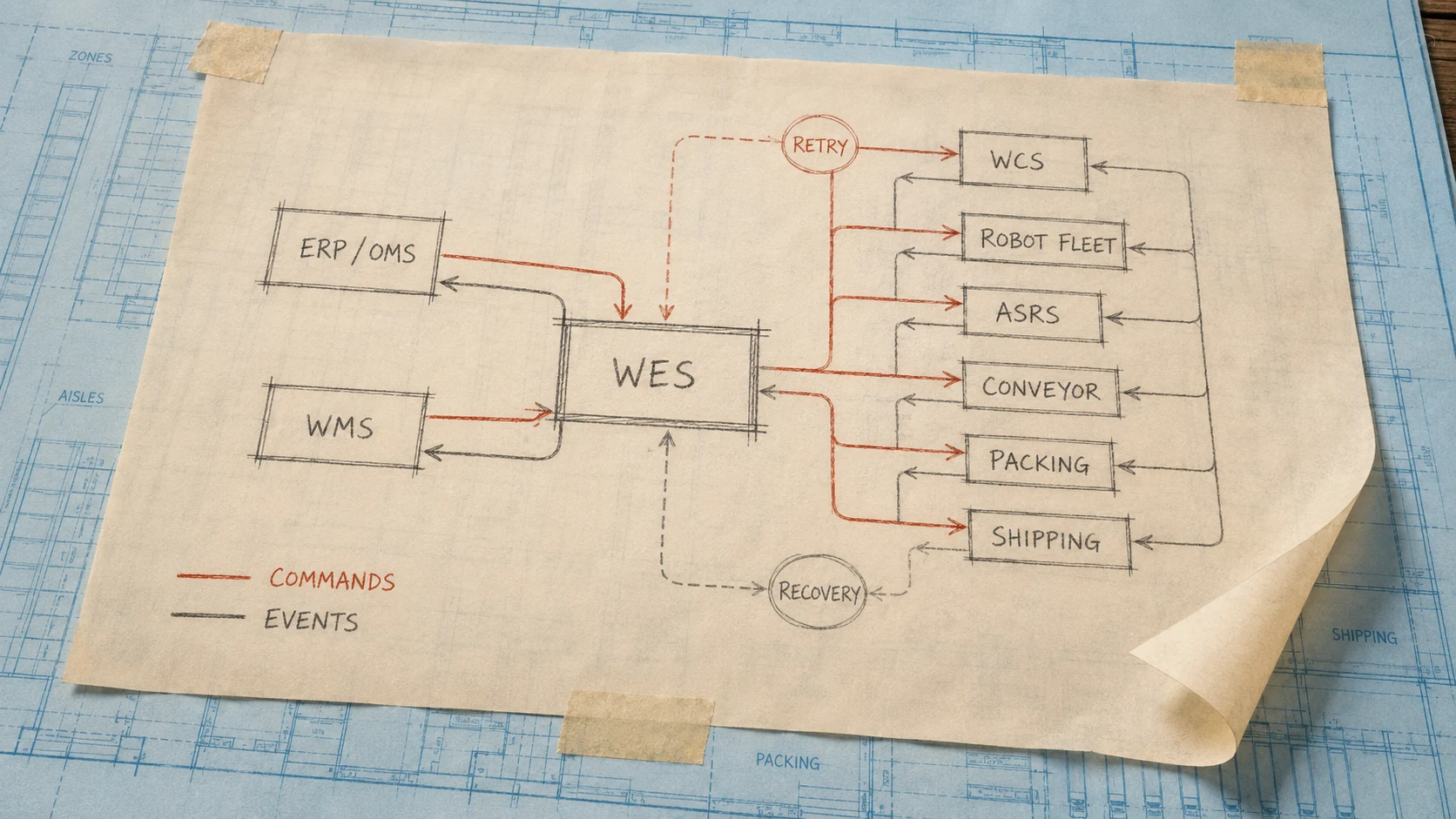
WES integration is not merely connecting two APIs. It is agreeing on business events, ownership, response timing, failure behavior, data mapping, and acceptance criteria across several systems.
A common logical architecture looks like this:
text

ERP / OMS

    |

    v

WMS — inventory, orders, locations, warehouse rules

    |

    v

WES — priority, release, sequencing, resource and flow orchestration

    |

    +--> labor, RF, voice, pick-to-light, packing

    |

    +--> WCS, robot fleet managers, subsystem APIs

              |

              v

        ASRS, AMRs, conveyors, sorters, robots, PLCs
Some products collapse these layers. Some equipment systems connect directly to WMS. The architecture should follow the operating model and responsibility boundaries, not an arbitrary diagram.
Enterprise-System Integration
The WES may exchange data with ERP, OMS, WMS, TMS, labor systems, parcel systems, identity services, and analytics platforms. Typical data includes:
- Order, line, priority, due-time, cancellation, and hold status
- SKU, unit of measure, lot, serial, expiry, dimensions, and handling rules
- Inventory availability, reservation, shortage, and reconciliation events
- Container, tote, carton, pallet, and location identities
- Pick, pack, quality, label, manifest, and shipment confirmations
Oracle's WMS documentation documents REST services and SFTP-based integrations, while its automation guidance emphasizes events, response timing, field formats, transformations, throughput, and concurrency. The lesson applies beyond Oracle: an interface specification must describe behavior, not only endpoints.
Automation and Control Integration
WES may connect to WCS, ASRS controllers, conveyor systems, sorters, robot fleet managers, scanners, light or voice systems, and PLC-connected equipment. Each subsystem has a different control boundary.
AutoStore's official interface documentation provides a useful example. Its higher-level Task Interface and lower-level Bin Interface allocate different responsibilities to the customer's software. The choice changes how much grouping, preparation, and optimization the external WES or WMS must perform. “Connected to AutoStore” therefore says less than “which interface is used, and who owns each decision?”
For a broader technical treatment, see ASRS system integration.
Events, Timing, and Recovery
Every critical integration should define:
- Ownership: Which system is authoritative for the state?
- Trigger: What business event creates the message?
- Acknowledgment: How does the sender know it was accepted?
- Ordering: What happens if messages arrive late or out of sequence?
- Idempotency: Can the same event be processed safely more than once?
- Timeout and retry: When is a retry safe, and when is operator review required?
- Replay and audit: Can the event history reconstruct what happened?
- Recovery: How are WMS, WES, WCS, and physical inventory reconciled after an outage?
These details determine whether an integration is resilient or merely functional during a demonstration.
How Much Does WES Software Cost?
WES software does not have a reliable universal price range. The official sources reviewed for this guide do not provide a comparable market price list, and public prices would still be misleading without integration, testing, infrastructure, and support scope.
Two warehouses can license the same core software and have very different project costs. One may connect a WMS to one shuttle system using standard interfaces. Another may require ERP and WMS changes, several robot fleets, conveyors, sortation, custom exception logic, high-availability infrastructure, emulation, and 24/7 support.
Instead of asking only for “software price,” request a five- to ten-year total-cost-of-ownership breakdown.

| TCO category | What the quote should disclose |
|---|---|
| Software | License or subscription metric, modules, sites, users, test environments |
| Discovery and design | Process mapping, requirements, solution design, project management |
| Enterprise integration | Standard connectors, custom APIs, middleware, mapping, data cleanup |
| Automation integration | Each WCS, ASRS, conveyor, sorter, robot, light, voice, or PLC interface |
| Configuration and customization | Rules, workflows, screens, reports, exception logic |
| Testing and commissioning | Emulation, FAT, SAT, volume tests, cutover rehearsal, regression testing |
| Infrastructure | Cloud, edge or on-premises servers, databases, monitoring, backup, disaster recovery |
| Training and change | Administrator, operator, maintenance, documentation, change management |
| Support | Support hours, SLA, patches, upgrades, cybersecurity response, onsite coverage |
| Future change | New equipment, new workflows, connector upgrades, custom-code maintenance |
The Main WES Cost Drivers
- Number of systems and interfaces. Each named system, vendor, version, and protocol adds design and testing scope.
- Operational complexity. More zones, service levels, exception paths, and shared constraints require more configuration and validation.
- Data readiness. Incomplete item dimensions, location rules, inventory accuracy, or container identities create integration work before orchestration can be trusted.
- Performance and availability requirements. Peak throughput, latency, redundancy, disaster recovery, and 24/7 operations affect architecture and testing.
- Customization. Custom logic can create value, but it also creates upgrade, support, and regression-testing obligations.
- Commissioning depth. Emulation, interface testing, peak-volume testing, and failover rehearsal cost money but reduce go-live risk.
- Lifecycle support. Software maintenance, API changes, equipment additions, security patches, and support coverage continue after launch.
Cloud deployment may reduce upfront infrastructure for some products. Honeywell makes that claim for its cloud WES offering. It should not be generalized into “cloud is always cheaper,” because subscription, networking, edge dependencies, data requirements, support, and long-term change still affect TCO.
For the wider automation cost picture, read ASRS total cost of ownership and ASRS system cost.
When Does a Warehouse Need WES?
WES is most valuable when the operating problem is cross-system orchestration rather than basic inventory management or isolated machine control.
Strong WES Fit Signals
- Several automation systems or WCS domains share work, buffers, or stations.
- Manual and automated zones must contribute to the same orders.
- Priorities change throughout the day because of cutoffs, SLAs, production demand, or replenishment risk.
- One fast subsystem frequently overwhelms another.
- Operators spend significant time manually expediting or rebalancing work.
- New automation will be added in phases and must coexist with existing systems.
- Multi-client, multi-channel, or multi-temperature workflows create competing constraints.
- The operation needs coordinated exception handling and a common execution view.
These conditions commonly appear in e-commerce fulfillment, 3PL warehouses, apparel, retail distribution, manufacturing supply, and mixed-automation facilities.
When WES May Be Unnecessary or Premature
A WES may add little value when:
- The warehouse is simple, largely manual, and adequately directed by its WMS.
- One automation subsystem handles the process and its native controller already provides enough orchestration.
- The real constraint is insufficient physical capacity rather than poor work coordination.
- Inventory, master data, or standard operating procedures are too unstable to support reliable automation decisions.
- Equipment reliability is the primary problem.
- The organization lacks ownership for exceptions, support, and process governance.
Adding software cannot repair every warehouse problem. Confirm whether the constraint is orchestration, equipment, layout, capacity, data, or operating discipline before adding another system layer.
How to Implement WES Software
A WES implementation should begin with operating decisions, not screens or APIs.
Step 1: Define the Operating Model
Document order types, priorities, cutoffs, replenishment rules, station capacities, exception paths, manual work, and degraded modes. Decide how the operation should behave before configuring the software.
Step 2: Create a Responsibility Matrix
Assign ownership for inventory, order priority, task creation, task release, routing, machine commands, safety logic, exception recovery, and reporting. Resolve overlaps between WMS, WES, WCS, fleet managers, and equipment controllers.
Step 3: Specify Interfaces as Events
Define data, timing, acknowledgments, retry, idempotency, replay, audit, and reconciliation. Include expected peak message volume and concurrency, not only average conditions.
Step 4: Configure and Prototype Critical Flows
Start with the flows that determine project risk: inventory induction, priority release, retrieval, replenishment, consolidation, shipping confirmation, cancellation, and failure recovery.
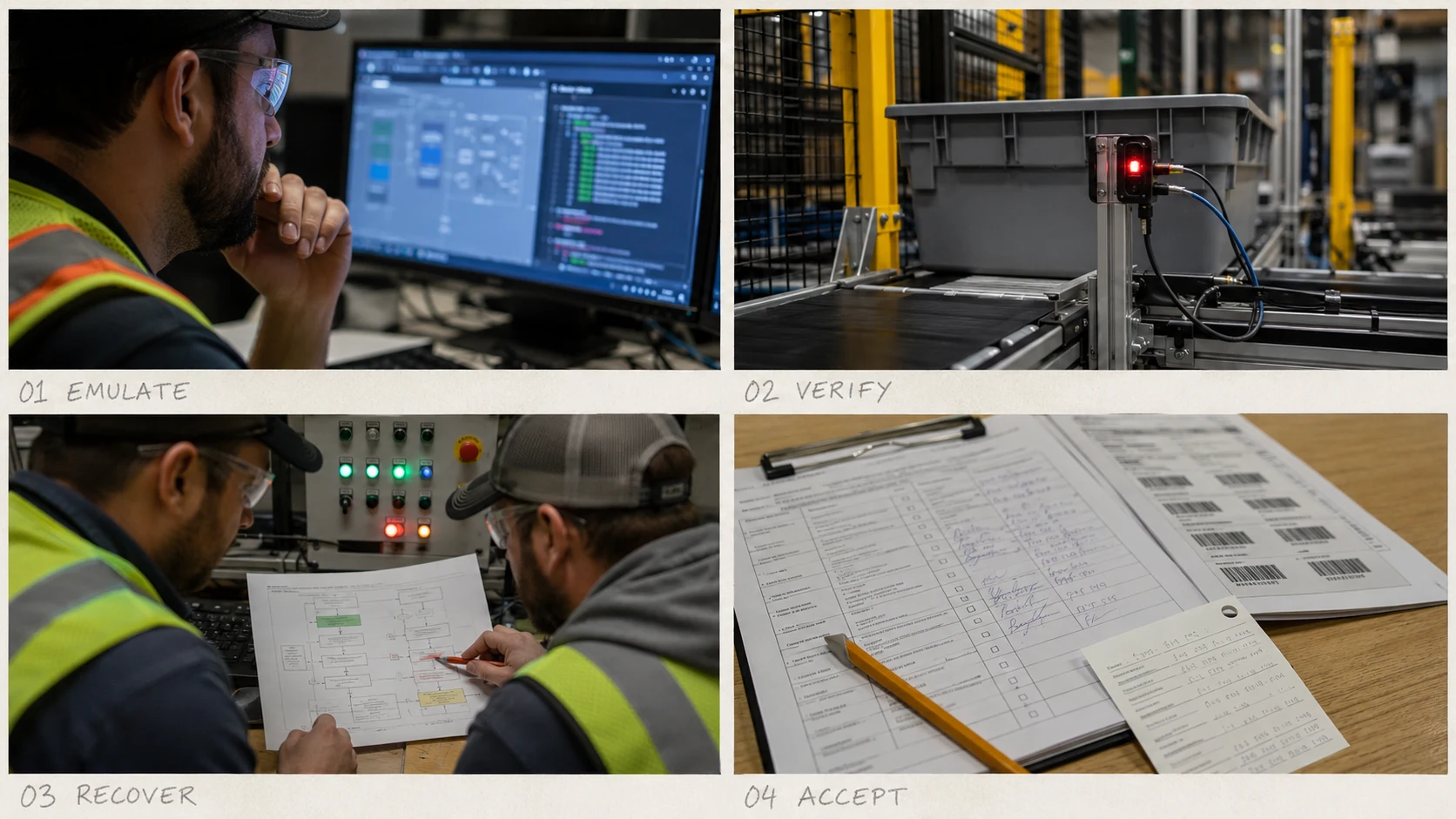
Step 5: Emulate Before Equipment Is Ready
MHI's implementation guidance recommends emulator-based testing, and Honeywell offers an emulation product for validating software and integration behavior before physical installation. Emulation lets teams test sequence, interfaces, capacity assumptions, and failure scenarios earlier.
Step 6: Run FAT, SAT, Volume, and Recovery Tests
Acceptance should cover normal flows, peak conditions, network loss, duplicate or delayed messages, equipment faults, manual recovery, failover, and inventory reconciliation. A system that passes a happy-path demo is not production-ready.
Step 7: Stabilize, Measure, and Tune
After go-live, compare actual queue depth, cycle time, station utilization, exception rate, and cutoff performance against the design assumptions. Optimization rules need tuning as order profiles and operating behavior become visible.
For a full project sequence, see the ASRS implementation timeline.
How to Choose WES Software
The best WES is not the platform with the longest feature list. It is the platform whose responsibility model, interfaces, recovery behavior, and lifecycle fit your operation.
Ask vendors these questions:
- Is the WES standalone, embedded in WMS, or bundled with WCS functions?
- Which system remains the inventory system of record?
- Which modules are standard, configurable, optional, custom, or partner-supplied?
- Which named ERP, WMS, automation vendors, models, and versions are already supported?
- Which connections are proven connectors and which require new engineering?
- How are order priority, continuous release, waves, replenishment, and consolidation conflicts handled?
- What happens when WMS, WES, WCS, the network, or an equipment subsystem is unavailable?
- Which emulation, FAT, SAT, volume, failover, and regression tests are included?
- What are the measurable acceptance criteria?
- How are APIs versioned, and who pays when an integrated system changes?
- What support hours, severity levels, restoration targets, and escalation paths apply?
- What security, identity, encryption, logs, backups, RTO, RPO, and patching responsibilities are included?
- What will it cost to add another site, zone, robot fleet, or automation vendor?
- Can the vendor provide reference sites with a comparable order profile and automation mix?
- Which parts can be retained if the WMS or equipment vendor changes later?
If the project spans several suppliers, a warehouse automation system integrator should own the end-to-end responsibility map and acceptance process. Otherwise, every supplier can meet its local specification while the combined system still misses the operating target.
Where GoASRS Fits
GoASRS approaches WES from the system-integration side. Our published product information describes a microservices-based WES designed to orchestrate mixed automation, picking, replenishment, and WMS/ERP integration. The practical value of that architecture should still be evaluated against the same procurement standards in this guide: named connectors, responsibility boundaries, recovery design, test evidence, support scope, and lifecycle cost.
For warehouses using one tightly integrated equipment platform, that vendor's native execution software may be the simplest choice. For operations combining ASRS, AMRs, conveyors, workstations, and existing enterprise software, an independent orchestration layer may offer more flexibility. The right answer depends on the operating model, not a preference for more software.
Explore the GoASRS WES software platform or review our warehouse automation systems guide for the hardware-and-software context.
Frequently Asked Questions
What does WES stand for in warehousing?
WES stands for Warehouse Execution System. It refers to software that coordinates and optimizes real-time warehouse work across orders, people, stations, and automation. A WES commonly manages task priority, work release, resource allocation, flow balancing, exceptions, and execution visibility.
Is WES the same as WMS?
No. A WMS normally owns inventory, locations, orders, receiving, allocation, and shipping rules. A WES focuses on real-time execution: deciding which work should run next and coordinating resources. Some modern WMS platforms embed WES capabilities, so buyers must verify the actual product scope.
Is WES the same as WCS?
No. WES typically makes orchestration decisions across the warehouse, while WCS translates work into commands for conveyors, sorters, shuttles, cranes, or other equipment. Some execution suites include WCS functions, which is why a responsibility matrix is more reliable than product labels.
Does every automated warehouse need WES?
No. A simple warehouse or a facility with one self-contained automation subsystem may operate effectively with WMS and the equipment's native controller. WES becomes more useful when multiple systems, manual zones, changing priorities, and shared downstream constraints must be coordinated.
Can WES replace WMS?
Sometimes a unified platform includes both sets of capabilities, but a standalone WES normally does not replace the WMS as the inventory and order system of record. Confirm who owns inventory, locations, allocation, and shipping transactions before changing the software architecture.
Can WES control robots from different vendors?
Some WES platforms are designed for multi-vendor integration, but “vendor agnostic” is not proof of compatibility. Ask for named robot models, supported software versions, interface type, certification, reference sites, and responsibility for future API changes.
How much does WES software cost?
WES pricing is generally project-specific. The total depends on modules, sites, enterprise interfaces, automation connectors, custom rules, infrastructure, emulation, commissioning, training, support, and future changes. Request a detailed TCO breakdown instead of relying on an unsupported generic price range.
How long does WES implementation take?
The timeline depends on system count, interface quality, operating complexity, data readiness, testing depth, and site readiness. A standard connection to one automation zone can be much faster than a multi-vendor operation with ERP, WMS, WES, WCS, ASRS, AMRs, conveyors, and 24/7 cutover requirements.
What data does WES need?
Typical inputs include orders, priorities, due times, inventory availability, handling units, resource status, queue depth, equipment availability, station capacity, and exceptions. The WES also needs clear ownership, timing, retry, audit, and reconciliation rules for every critical event.
What is the biggest risk in a WES project?
The biggest risk is unclear responsibility between systems and suppliers. If inventory, priority, release, routing, machine commands, exceptions, and recovery are not assigned explicitly, gaps and conflicting logic emerge during commissioning. Interface emulation and failure-recovery testing should be planned from the start.
The Bottom Line
WES software is valuable because automated warehouses need more than inventory planning and machine control. They need a real-time layer that decides what work should happen next, balances flow across constraints, coordinates people and equipment, and manages exceptions without losing operational state.
But WES is not a universal box, and it is not necessary for every warehouse. Modules overlap, integrations differ, and pricing depends heavily on project scope. The safest buying process is to define responsibilities, interfaces, recovery behavior, acceptance tests, and lifecycle cost before comparing product claims.
If your facility is adding ASRS, AMRs, conveyors, or several automation zones, contact GoASRS with your order profile, current software stack, equipment plan, and throughput constraints. We can help determine whether you need a dedicated WES, an embedded execution layer, or a simpler integration architecture.
Primary Sources
- MHI-hosted FORTNA: WMS, WCS and WES
- MHI: Warehouse Execution Software Implementation
- MHI: SLAM 101
- Dematic Software
- Honeywell Momentum WES
- Manhattan Active Warehouse Management
- AutoStore Interface Introduction
- SAP EWM: Fully Automated Warehouse
- Oracle WMS Communication and Data
- Oracle: Integrating WMS with Multiple Automation Control Systems
Planning a Warehouse Automation Project?
Our team has delivered 50+ ASRS systems across retail, manufacturing, and logistics. Tell us about your project and we will get back to you within 24 hours.
Thank you!
We received your message and will get back to you within 24 hours.