
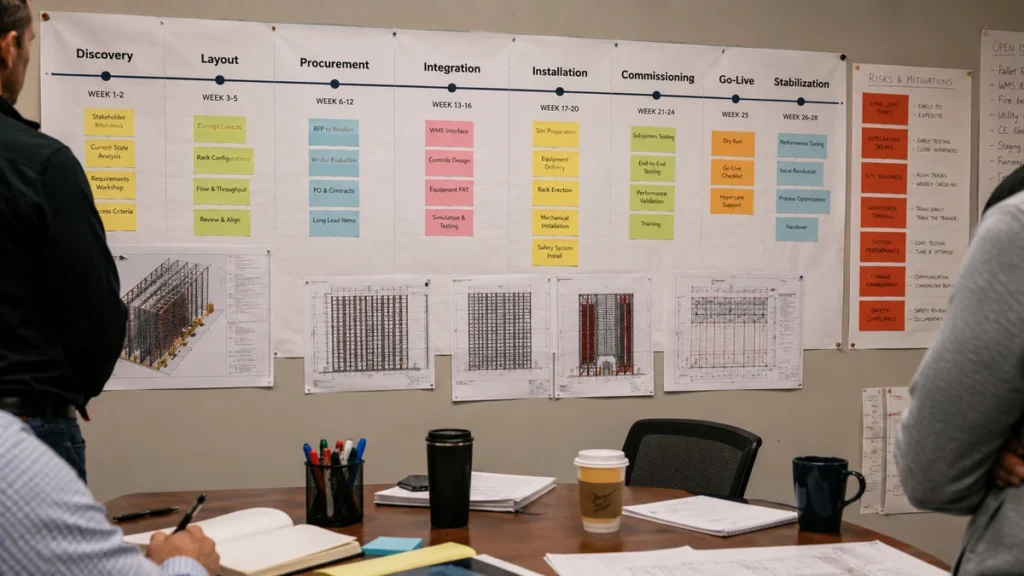
An ASRS implementation timeline is the practical schedule that takes a warehouse automation project from initial requirements to stable daily operation. It includes data analysis, concept design, budget approval, detailed engineering, software integration, equipment manufacturing, site preparation, installation, commissioning, go-live, and post-launch stabilization.
For many buyers, the hardest part is not understanding what ASRS does. The hard part is knowing how long the project will really take, what must happen before equipment arrives, which decisions create delays, and how to avoid a painful go-live.
Short answer: A realistic ASRS implementation timeline usually takes 6 to 18 months depending on system type, building readiness, software integration, procurement lead time, permitting, fire protection, and operational complexity. A compact VLM or small goods-to-person system may launch in a few months. A multi-aisle pallet ASRS, shuttle ASRS, or multi-vendor project with WMS, WES, WCS, ERP, conveyors, and AMRs can take a year or more.
This guide breaks the ASRS implementation timeline into practical phases, with deliverables, owners, risks, and buyer checkpoints for each stage.
What an ASRS Implementation Timeline Includes
An ASRS implementation timeline is not only an equipment delivery schedule. It is a cross-functional project plan that connects physical automation, building work, warehouse software, operating procedures, safety review, staff training, and go-live readiness.
MHI describes automated storage as computer-controlled systems that automatically place and retrieve loads from defined storage locations. That definition matters because an ASRS project is never only racking or robots. It includes controls, data, physical storage, retrieval logic, and operating processes.
External reference: MHI Automated Storage.
A complete timeline should cover:
- Business case and ROI model
- SKU, inventory, and order data analysis
- Load unit definition
- Concept layout and flow design
- Vendor selection and contract scope
- Detailed engineering
- Fire protection and safety review
- WMS, WES, WCS, ERP, PLC, and device integration
- Equipment manufacturing and factory testing
- Site preparation
- Installation and mechanical completion
- Commissioning and software testing
- User training and SOP development
- Go-live, ramp-up, stabilization, and handover
If the timeline only shows "equipment ordered, equipment installed, go-live," it is not detailed enough for a serious project.
Planning Questions by ASRS System Type
The schedule depends on the project scope, site conditions, interfaces, and agreed milestone definition. The comparison below is a planning prompt, not a universal duration benchmark. Confirm each item against the load profile, building, interface boundary, operating plan, and the point at which the project defines go-live.
ASRS system planning questions
The useful question is what must be designed, integrated, tested, and accepted before go-live. These rows describe items to confirm during discovery, not fixed characteristics of every project.
| System type | Planning questions | Main prerequisites to confirm | Integration boundary to map | Risks to test | Possible release pattern |
|---|---|---|---|---|---|
| Compact VLM | Which load dimensions, operator steps, floor conditions, utilities, and approvals must be closed? | Load rules, operator workflow, floor and utility checks | Station, inventory, and order interfaces | Late site access, unclear load rules, incomplete master data | Controlled station and SKU release if appropriate |
| Small goods-to-person | Which storage modules, stations, picking processes, and replenishment rules are in scope? | Tote or bin standard, SKU data, station design, replenishment rules | WMS and control-layer coordination | Data cleanup, station scope changes, exception design | Pilot zone or selected process if appropriate |
| AMR | Which routes, traffic rules, handoff points, charging areas, and live-site constraints require approval? | Maps, safety zones, charging, traffic plan, handoff design | Fleet management, WMS/WES, doors, lifts, and other equipment | Route changes, blocked access, unclear exception ownership | Limited routes and shifts for validation if appropriate |
| Shuttle ASRS | Are lifts, conveyors, stations, scanners, mixed loads, or fire reviews part of the storage scope? | Rack geometry, load unit, fire review, throughput model | WMS/WES/WCS, conveyors, lifts, scanners, and stations | Rack or fire changes, interface defects, station bottlenecks | Zone-based commissioning and ramp-up if appropriate |
| Pallet ASRS | Which rack, load, access, building, safety, utility, and production connections must be designed together? | Pallet standard, floor and building checks, fire strategy, traffic plan | WMS/WCS, cranes or shuttles, conveyors, lifts, and production links | Building readiness, pallet variability, utilities, acceptance criteria | Controlled pallet families or operating areas if appropriate |
| Multi-vendor project | Where does the integration boundary sit, and which supplier owns each interface and combined test? | Responsibility matrix, interface control, shared test plan, one change process | Multiple equipment controls plus WMS/WES/WCS and customer systems | Supplier gaps, message ownership, late combined testing | Staged subsystem acceptance followed by end-to-end release if appropriate |
For the system families and integration layers used in this comparison, see Types of ASRS Systems, How to Choose ASRS System, and WES vs WMS vs WCS. The WMS, WCS, and RCS responsibilities described in the table should be assigned in the project responsibility matrix, not assumed from product names.
Parallel workstreams in an ASRS implementation timeline
An ASRS project is not a single queue of handoffs. After the operating scope and interfaces are stable enough to work from, detailed engineering, software-interface design, procurement, site preparation, training preparation, and test planning can progress in parallel. Each stream still has a gate: released drawings before fabrication, agreed interface rules before integrated testing, safe access before installation, and installed and powered subsystems before commissioning.
| Workstream | Can overlap with | Must wait for or prove |
|---|---|---|
| Engineering and layout | Software interface design, procurement planning, site surveys | Load rules, flow assumptions, safety and fire review |
| Procurement and manufacturing | Software development, SOP drafting, training preparation | Released scope, approved drawings, confirmed specifications |
| Site preparation | Manufacturing, software testing, training preparation | Access plan, utilities, floor and network readiness |
| Software integration | Engineering, manufacturing, site preparation | Ownership matrix, data mapping, interface test cases |
| Mechanical installation | Late-stage software and training preparation | Safe access, delivered equipment, released installation sequence |
| Commissioning and testing | Operator and maintenance training | Installed equipment, power, network, controls, and test scripts |
Parallel work shortens elapsed time only when the inputs are controlled. Starting every stream early without stable assumptions can create rework that is harder to see than a simple serial plan.
Greenfield versus brownfield planning
Greenfield and brownfield projects should not be assigned a fixed winner on speed. A greenfield site can coordinate building, utilities, fire protection, and automation before warehouse operations begin. A brownfield site must protect live inventory, shipping commitments, staff routes, safety access, and existing system interfaces while work proceeds. The better question is which constraints are already fixed and which can still be changed.
| Planning condition | Schedule questions to answer | Go-live implication |
|---|---|---|
| Greenfield | Are the floor, utilities, network, fire design, docks, and equipment layout being released together? | The cutover plan can be built around a new operating start, but data and process readiness still matter. |
| Brownfield | Which aisles, docks, inventory zones, shifts, and interfaces must remain available during installation? | Use zones, windows, fallback processes, or phased migration to protect the live operation. |
Inventory migration deserves its own workstream in either case. Confirm item-master and location data, load-unit rules, reconciliation ownership, exception handling, fallback operation, and whether the cutover will be phased or run in parallel. Do not treat migration as a final data upload after equipment testing.
| Project type | Typical timeline | Why it varies |
|---|---|---|
| Vertical lift module or small parts ASRS | 3 to 6 months | Limited integration, smaller footprint, simpler site work |
| Compact goods-to-person or bin robot system | 4 to 9 months | Faster deployment, but still needs decanting, stations, and software |
| Mini-load ASRS | 6 to 12 months | Rack, crane, totes, controls, station design, WMS/WES integration |
| Shuttle ASRS | 8 to 15 months | More moving parts, lifts, stations, sequencing, peak testing |
| Pallet ASRS or high-bay ASRS | 10 to 18+ months | Civil work, floor load, fire protection, cranes, conveyors, safety, permits |
| Multi-vendor warehouse automation program | 12 to 24+ months | ASRS, AMR, conveyors, WES, ERP/WMS, phasing, change management |
These ranges are not guarantees. They are planning ranges. A small system can still be delayed by poor master data, unavailable power, late permits, or unclear WMS ownership. A large project can move faster if the building is ready, scope is stable, and integration boundaries are clear.
For layout planning before implementation, read ASRS Warehouse Design Layout. For cost planning, pair the schedule with ASRS total cost of ownership and warehouse automation ROI.
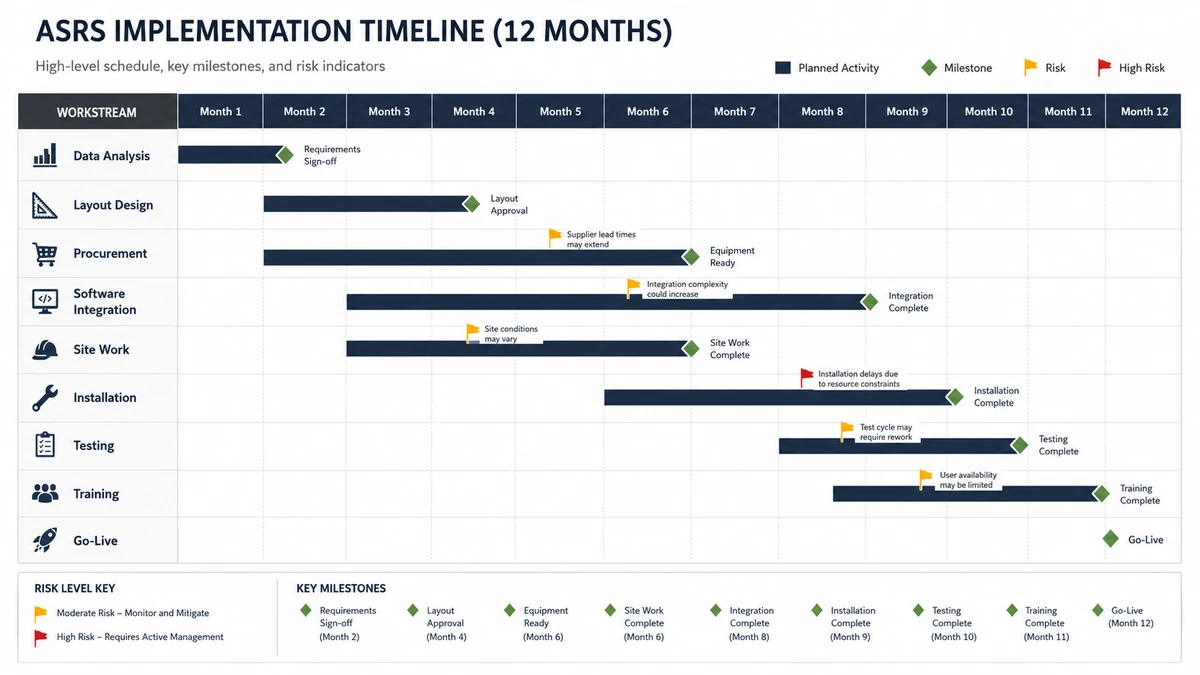
Phase 1: Discovery and Requirements, 2 to 6 Weeks
The first phase defines what the project must solve. This is where many bad timelines begin. If the project starts with "we need 20 robots" or "we need a shuttle system," the timeline is already biased toward a technology instead of an operating requirement.
The discovery phase should answer:
- What business problem is driving the project?
- Is the constraint space, labor, accuracy, throughput, safety, traceability, cold-chain exposure, or peak volatility?
- What load units will the system handle?
- What order profile must the system support?
- What daily and peak-hour throughput is required?
- Which systems currently own inventory, orders, waves, and shipping?
- Which building constraints are fixed?
- What future growth must the design support?
Key deliverables:
- Current-state process map
- SKU and order data request list
- Load unit assumptions
- Throughput target range
- Building constraint summary
- Initial risk register
- Decision log
Buyer checkpoint:
Do not approve the next phase until the project team can state the problem in one sentence. For example: "We need to automate tote storage and goods-to-person picking because peak order lines exceed manual picking capacity during promotion weeks." A vague goal such as "improve warehouse efficiency" is not enough.
Phase 2: Data Analysis and Concept Design, 3 to 8 Weeks
The second phase turns assumptions into a design direction. This is where the project team analyzes inventory, SKU velocity, order lines, inbound flow, returns, seasonality, slotting, and growth.
Important data includes:
- SKU count and active SKU count
- Inventory by day or week
- Order lines per hour, day, and peak period
- Units per line
- Pallet, tote, carton, tray, or bin dimensions
- Weight distribution
- Lot, serial, expiry, temperature, and quality rules
- Returns and exception rates
- Dock schedule and shipping cutoff
- Labor plan by shift
The concept design should compare more than one system pattern. For example, a high-SKU ecommerce site might compare shuttle ASRS, bin robot, mini-load ASRS, AMR-assisted goods-to-person, or a hybrid design. A manufacturing site might compare pallet ASRS, mini-load, line-side AGV delivery, or a WIP buffer.
Key deliverables:
- Concept layout
- Storage capacity model
- Throughput model
- Station count estimate
- High-level software architecture
- Rough budget range
- ROI assumption list
- Phase 1 and phase 2 expansion options
Buyer checkpoint:
Ask whether the concept supports peak-hour flow, not only total storage. A dense ASRS that cannot feed picking, packing, or production at the required rate will create a different bottleneck.
For system selection, see How to Choose ASRS System and Types of ASRS Systems.
Phase 3: Business Case and Vendor Selection, 4 to 10 Weeks
Once concept options are clear, the project moves into business case and vendor selection. This phase is often underestimated because teams focus on equipment price and forget integration, building work, training, and stabilization.
The business case should include:
- Equipment cost
- Software license or development cost
- Integration cost
- Civil, electrical, floor, fire protection, and network work
- Installation and commissioning
- Spare parts
- Maintenance and support
- Training
- Temporary productivity loss during cutover
- Downtime risk
- Future expansion cost
Vendor selection should evaluate both equipment fit and project execution capability. A low equipment price is not useful if the vendor cannot manage integration, testing, support, and post-go-live response.
Key deliverables:
- Final concept recommendation
- Budget approval pack
- Vendor comparison matrix
- Responsibility matrix
- Draft implementation timeline
- Contract scope
- Change control process
- Acceptance criteria
Buyer checkpoint:
Make sure the proposal clearly states who owns WMS, WES, WCS, PLC, robot fleet, conveyor, network, data migration, exception handling, and go-live support. If the answer is "the customer and vendors will coordinate," the project needs a stronger integration owner.
For multi-vendor projects, read Warehouse Automation System Integrator and ASRS System Integration.
Phase 4: Detailed Engineering and Site Readiness, 6 to 16 Weeks
Detailed engineering turns the concept into buildable design. This phase includes mechanical layout, rack design, workstation design, controls architecture, network design, safety review, fire protection coordination, civil changes, and installation planning.
For a new building, this phase may overlap with construction. For an existing warehouse, it must account for operations continuing during installation.
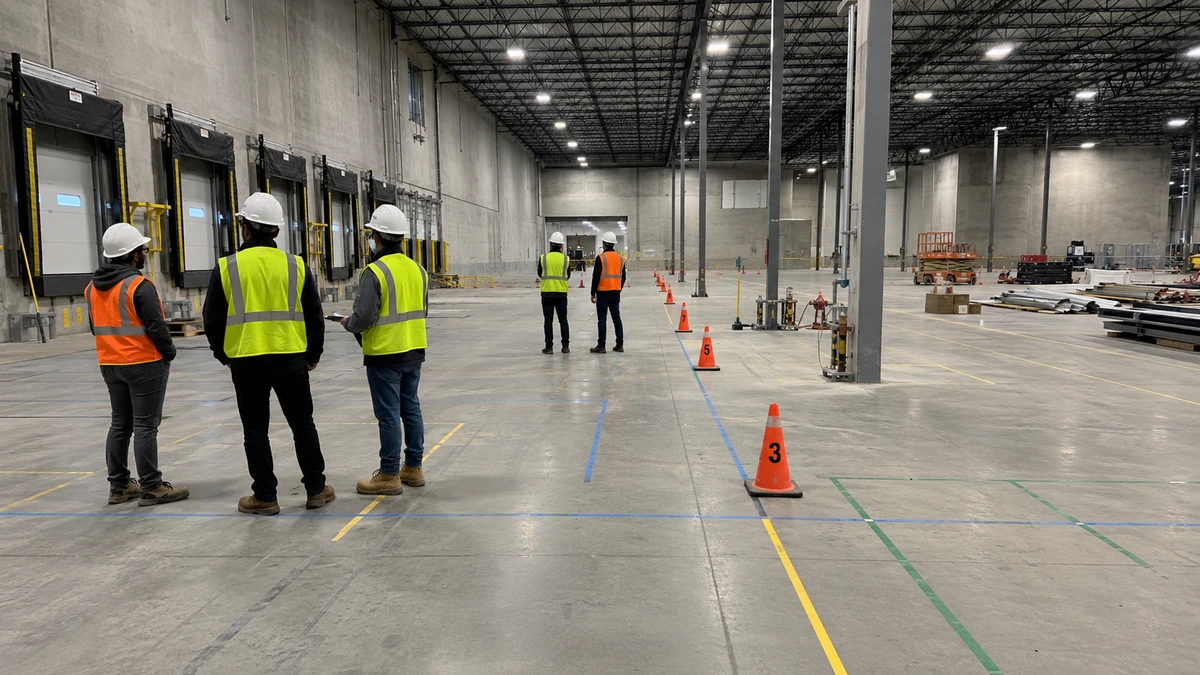
Site readiness topics include:
- Floor flatness and floor load
- Ceiling height and column grid
- Dock access and staging space
- Power and compressed air
- Network and Wi-Fi coverage
- Fire protection and sprinkler coordination
- Emergency access and egress
- Machine guarding and safety zones
- Installation sequence and temporary storage
- Dust, temperature, humidity, or cleanroom requirements
OSHA's warehousing guidance highlights common warehouse hazards around material handling, powered industrial trucks, ergonomics, slips, falls, and related work areas. Automation can reduce some risks, but only when safety is designed into the layout and implementation plan.
External reference: OSHA Warehousing.
Fire protection should also be handled early. NFPA 13 is a core reference for sprinkler system design, and automated storage often needs early coordination among the owner, insurer, local authority, fire protection engineer, rack supplier, and integrator.
External reference: NFPA 13.
Key deliverables:
- Approved layout
- Rack and equipment drawings
- Controls architecture
- Safety review plan
- Fire protection review notes
- Utility requirements
- Site readiness checklist
- Installation method statement
- Updated timeline and risk register
Buyer checkpoint:
Do not release manufacturing if the layout still has unresolved fire, floor, safety, utility, or software-interface assumptions. Late changes after manufacturing can create expensive rework.
Phase 5: Software Integration Design, 6 to 14 Weeks
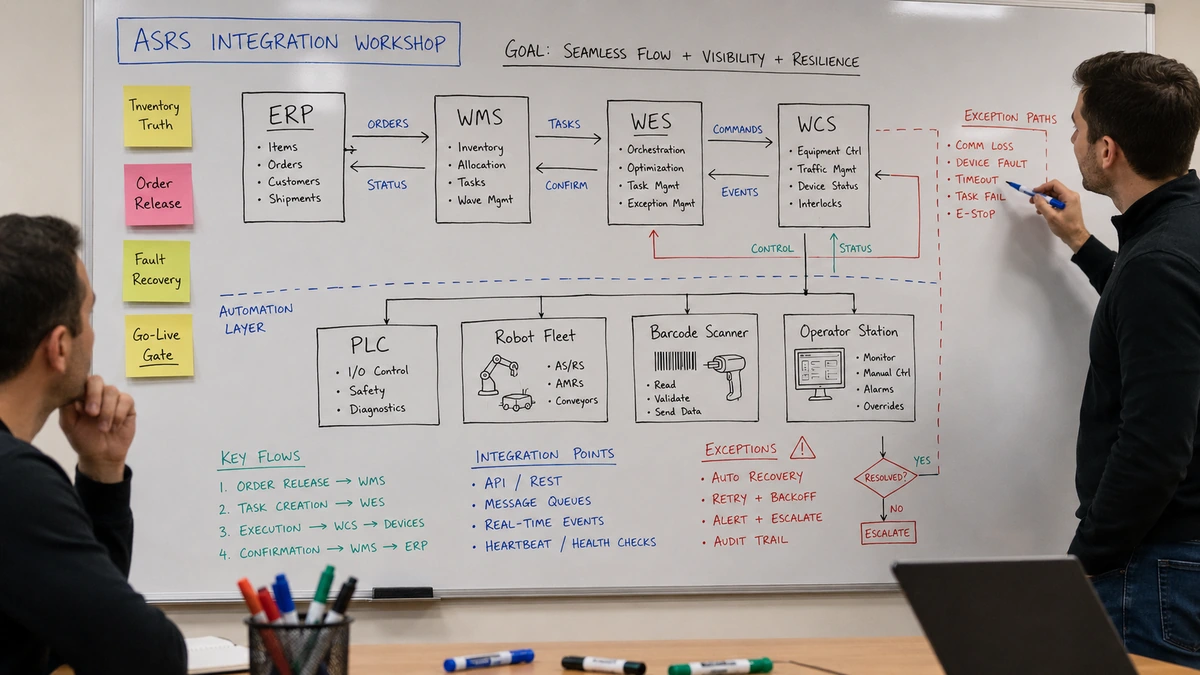
Software integration can run in parallel with engineering, but it cannot be left until installation. ASRS depends on clean data and clear ownership across ERP, WMS, WES, WCS, PLC, scanners, label printers, robot fleets, conveyors, and stations.
The integration design should define:
- Which system owns inventory truth
- Which system releases orders or work
- Which system prioritizes tasks in real time
- Which system controls machines
- Which events are written back
- Which exception codes are used
- How retries and duplicate messages are handled
- What happens during downtime
- How manual overrides are recorded
For industrial connectivity, many automation environments use vendor APIs, message queues, OPC UA, fieldbus protocols, or PLC interfaces. OPC Foundation describes OPC UA as an open architecture for industrial information exchange, which is why it is often part of control-layer integration discussions.
External reference: OPC Foundation OPC UA.
Key deliverables:
- Interface control document
- Data mapping
- Message timing rules
- Exception handling design
- Test scenarios
- Cutover plan
- Monitoring and alert rules
Integration and cybersecurity gates
The schedule should name an owner for inventory truth, order release, task orchestration, machine control, event write-back, retries, exception codes, downtime behavior, and manual overrides. The company material describes WMS, WCS, and RCS as separate software layers and notes ERP/MES connections. The project team should separately assign ownership for those boundaries and define its acceptance rules as part of project planning.
Cybersecurity is a delivery workstream, not a review added after commissioning. Review potential controls with the customer's IT/OT owners and the standards that apply to the site. The review may cover asset inventory, network boundaries, remote access, identities, patching responsibility, logging, incident response, and IT/OT change control. Record who approves each control rather than assuming one architecture fits every warehouse.
Buyer checkpoint:
Ask for test cases before coding is complete. If the team cannot describe how it will test missing inventory, barcode read failure, station full, robot fault, conveyor jam, short pick, emergency stop, and order cancellation, the integration design is incomplete.
For software layers, see WES vs WMS vs WCS.
Phase 6: Manufacturing, Procurement, and Factory Testing, 8 to 24 Weeks
Manufacturing lead time varies widely. Standard robots, conveyors, or VLM modules may be available quickly. Custom rack, stacker cranes, shuttle lifts, controls cabinets, safety systems, and specialized workstations can take longer.
This phase should not be passive waiting. While equipment is manufactured, the project team should finalize software development, site readiness, SOPs, test plans, training materials, spare parts, and support procedures.
Factory acceptance testing, often called FAT, should verify that equipment and controls meet baseline requirements before shipping.
FAT may include:
- Mechanical inspection
- Electrical panel check
- Robot or crane movement tests
- Conveyor routing tests
- Safety interlock check
- Barcode or RFID read tests
- Basic WCS command tests
- Load handling tests
- Fault simulation
Key deliverables:
- FAT checklist
- Shipping plan
- Spare parts list
- Installation schedule
- Site readiness signoff
- Updated risk register
Buyer checkpoint:
Do not treat FAT as a ceremonial visit. Use it to catch problems before equipment reaches the warehouse. Problems found in the factory are usually easier to fix than problems found during go-live week.
Phase 7: Installation, 4 to 16 Weeks
Installation is where the project becomes visible inside the warehouse. It includes unloading, staging, rack assembly, mechanical installation, electrical work, controls wiring, network setup, conveyor installation, workstation installation, guarding, sensors, scanners, and safety devices.
The installation plan should be sequenced around site constraints:
- Is the warehouse still operating?
- Are there night or weekend installation windows?
- Where will equipment be staged?
- Which aisles or docks must remain open?
- How will dust, noise, and safety barriers be controlled?
- Who approves daily work completion?
- What is the escalation path for blocked work?
For brownfield sites, installation planning is often harder than greenfield installation. The team must protect existing inventory, active staff, forklift routes, fire exits, and shipping commitments.
Key deliverables:
- Daily installation plan
- Site access rules
- Safety induction records
- Mechanical completion checklist
- Electrical completion checklist
- Punch list
- Updated commissioning schedule
Buyer checkpoint:
Hold daily installation reviews. A small blocked task can delay downstream commissioning if it affects power, network, guarding, or machine access.
Phase 8: Commissioning and Site Acceptance Testing, 3 to 10 Weeks
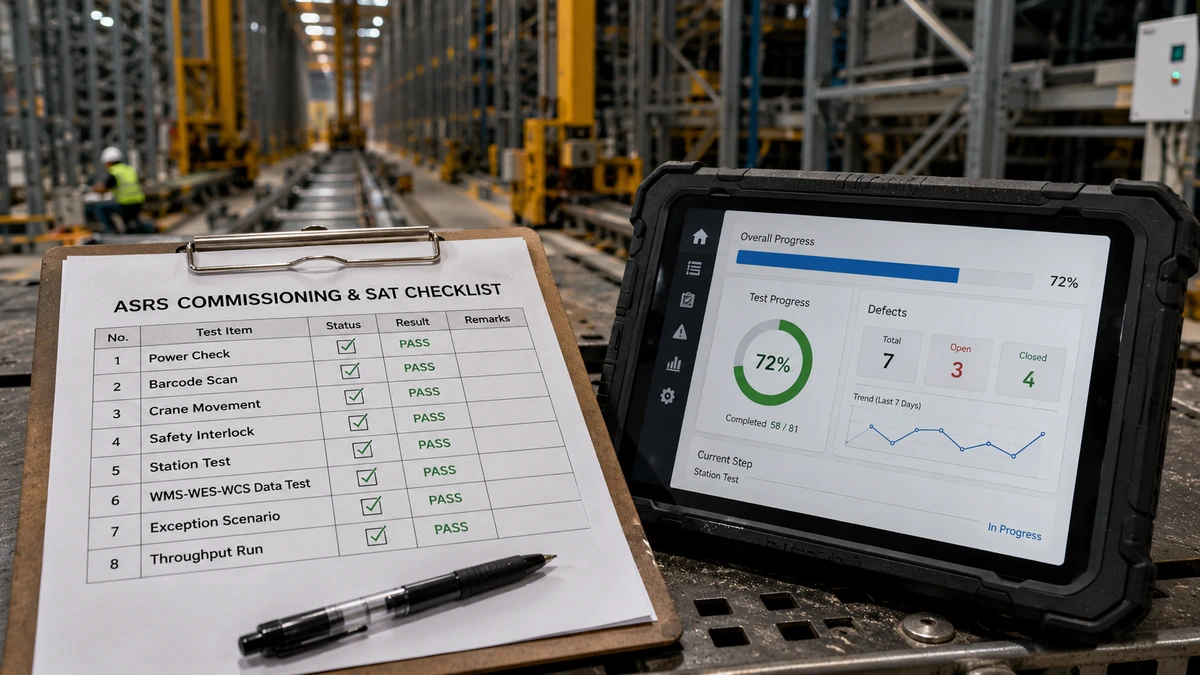
Commissioning proves that the installed system works in the real warehouse. Site acceptance testing, often called SAT, proves that the system meets agreed operational requirements.
Commissioning usually starts with subsystems:
- Power and network checks
- PLC and safety I/O checks
- Conveyor zone tests
- Crane, shuttle, robot, or lift movement tests
- Scanner and label printer tests
- Workstation UI tests
- WCS command tests
- WES orchestration tests
- WMS or ERP transaction tests
Then the project moves into end-to-end scenarios:
- Receive and induct inventory
- Store load units
- Retrieve load units
- Pick or replenish
- Handle exceptions
- Pack and ship
- Process returns
- Recover from equipment faults
- Reconcile inventory
Key deliverables:
- Commissioning checklist
- SAT test scripts
- Defect log
- Operator training plan
- Maintenance training plan
- Go-live readiness checklist
- Support escalation matrix
Buyer checkpoint:
Do not go live because the calendar says it is time. Go live when critical test scenarios pass, operators are trained, support is ready, and rollback rules are clear.
Phase 9: Training and Operational Readiness, 2 to 6 Weeks
Training should start before go-live, not after. Operators, supervisors, maintenance technicians, IT support, and warehouse managers need different training.
Operator training should cover:
- Station workflow
- Scanning rules
- Pick confirmation
- Replenishment process
- Exception handling
- Reject flow
- Safety rules
- When to stop and escalate
Supervisor training should cover:
- Dashboard interpretation
- Workload balancing
- Priority changes
- Labor allocation
- Exception queues
- Manual recovery
- Shift handover
Maintenance training should cover:
- Preventive maintenance
- Fault diagnosis
- Lockout/tagout procedures
- Spare parts
- Sensor cleaning
- Safe access
- Vendor escalation
IT and software support should cover:
- Interface monitoring
- Error logs
- Queue status
- Retry rules
- User permissions
- Backup and recovery
Key deliverables:
- SOPs
- Training attendance records
- Quick reference guides
- Shift handover process
- Support rota
- Go-live decision checklist
Buyer checkpoint:
Ask operators to run real scenarios before go-live. Classroom training is useful, but the real test is whether users can handle a missing item, unreadable barcode, station full, wrong tote, and urgent priority order without freezing the operation.
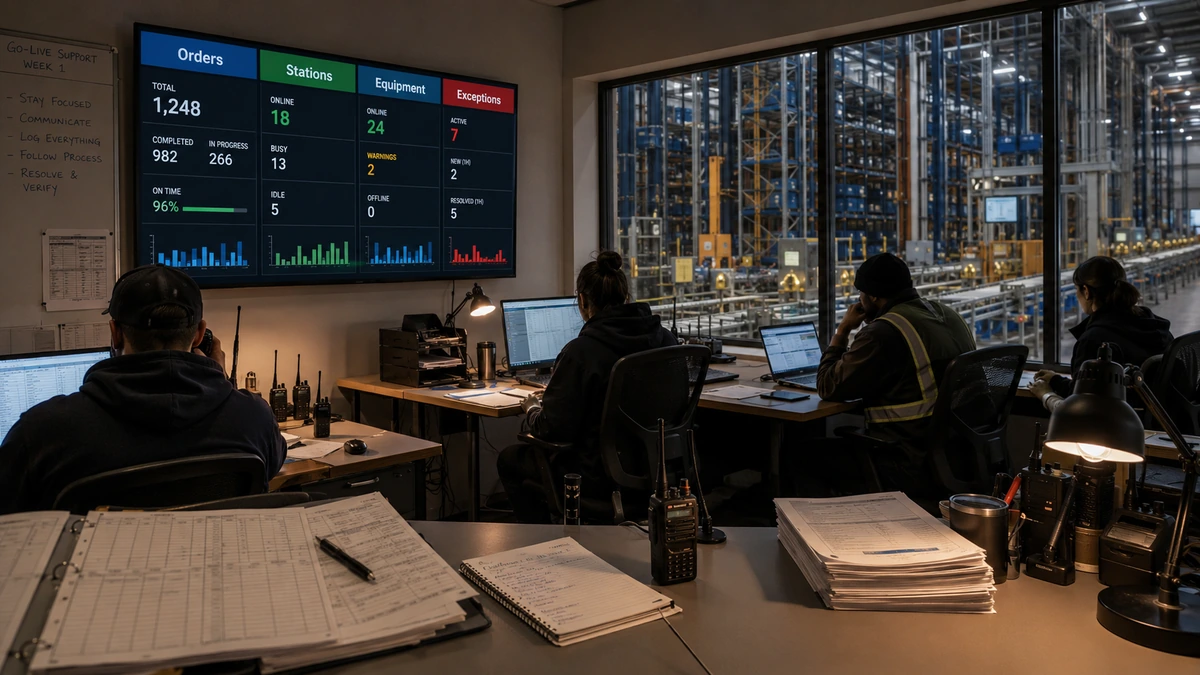
Phase 10: Go-Live, Ramp-Up, and Stabilization, 2 to 12 Weeks
Go-live is not the end of implementation. It is the beginning of controlled ramp-up.
A safer go-live usually starts with limited scope:
- One zone before all zones
- One shift before all shifts
- Selected SKUs before full SKU range
- Controlled order volume before peak volume
- Manual fallback available for exceptions
The first weeks should track:
- System availability
- Lines per hour
- Totes, pallets, or cartons per hour
- Station utilization
- Equipment faults
- Interface errors
- Inventory mismatches
- Operator errors
- Exception queue age
- Maintenance response time
Ramp-up should be treated as a controlled operating period with agreed measures, daily review, defect ownership, and a clear handover point. Track data and process issues alongside equipment faults because they may become potential constraints on output during ramp-up. Review slotting changes, training gaps, interface retries, inventory reconciliation, and unresolved exceptions against the agreed acceptance baseline before releasing the next zone, shift, SKU group, or order-volume step.
The project team should hold daily stabilization reviews. The purpose is not to blame the system or the operators. The purpose is to find patterns, correct procedures, adjust software rules, tune slotting, and remove friction.
Key deliverables:
- Go-live report
- Daily issue log
- Stabilization KPI dashboard
- Defect closeout list
- Handover document
- Optimization backlog
Buyer checkpoint:
Do not judge the system only by day-one throughput. A well-managed ASRS should ramp up through tuning, training, and operating discipline. What matters is whether problems are visible, owned, and shrinking.
Common Delays in an ASRS Implementation Timeline
The same delays appear across many automation projects.
Incomplete Data
If item dimensions, weights, order profiles, SKU velocity, or inventory history are wrong, the system may be sized incorrectly. Data cleanup should begin early.
Late Fire Protection Review
Fire protection can change rack design, storage height, sprinkler strategy, aisle requirements, and approval timing. Handle it before detailed engineering is frozen.
Building Not Ready
Power, network, floor, docks, HVAC, compressed air, staging space, and access routes can delay installation even when equipment arrives on time.
Unclear Software Ownership
If WMS, WES, WCS, ERP, PLC, and robot fleet responsibilities are vague, integration work will stall. Define ownership before development starts.
Underestimated Testing
Testing is not only "does the machine move?" It must include exceptions, inventory reconciliation, emergency stops, priority changes, lost messages, downtime, and manual recovery.
Go-Live Without Stabilization Plan
Automation needs ramp-up. If the project team disappears after launch, small defects become operational frustration.
ASRS Implementation Timeline Checklist
Use this checklist before committing to a schedule.
| Area | Questions to answer |
|---|---|
| Business case | Is the problem clearly defined and tied to measurable outcomes? |
| Data | Are SKU, order, inventory, dimensions, and peak data reliable? |
| Layout | Has the layout been reviewed for flow, safety, maintenance, and expansion? |
| Site readiness | Are floor, power, network, fire protection, and access requirements clear? |
| Software | Are WMS, WES, WCS, ERP, PLC, and device ownership boundaries defined? |
| Procurement | Are lead times realistic for custom equipment and controls? |
| Installation | Can the site support staging, access, and safe work without blocking operations? |
| Testing | Are FAT, SAT, integration, exception, and performance tests documented? |
| Training | Are operators, supervisors, maintenance, and IT trained before go-live? |
| Stabilization | Is there a post-go-live support plan with KPIs and issue ownership? |
How to Shorten the Timeline Without Increasing Risk
Some schedule compression is healthy. Some is dangerous.
Safe ways to shorten the timeline include:
- Start data cleanup early
- Freeze load-unit standards quickly
- Run software integration design in parallel with engineering
- Use phased deployment instead of one massive go-live
- Approve site readiness work before equipment delivery
- Use standard equipment where it fits the operation
- Create test scripts before equipment arrives
- Train supervisors before go-live week
Risky shortcuts include:
- Skipping concept comparison
- Delaying fire protection review
- Ignoring exception handling
- Assuming WMS data is clean
- Treating FAT and SAT as formalities
- Going live before operators are trained
- Launching peak volume on day one
The goal is not the shortest possible ASRS implementation timeline. The goal is the shortest timeline that still protects safety, uptime, inventory accuracy, and customer service.
FAQ
How long does ASRS implementation usually take?
Most ASRS implementations take 6 to 18 months. Smaller systems can be faster, while multi-vendor, high-bay, shuttle, cold storage, or heavily integrated projects may take 12 to 24 months.
What is the longest phase in an ASRS implementation timeline?
For simple systems, equipment lead time may be the longest phase. For complex warehouses, software integration, detailed engineering, fire protection review, and site readiness often drive the schedule more than equipment delivery.
Can ASRS be implemented in an existing warehouse?
Yes. Existing warehouses can be retrofitted with ASRS, but the timeline must account for floor load, ceiling height, column spacing, power, fire protection, installation phasing, live operations, and business continuity.
What should be completed before ordering ASRS equipment?
Before ordering, the team should confirm load units, capacity targets, throughput targets, concept layout, software ownership, fire protection assumptions, site constraints, and acceptance criteria.
Why do ASRS projects get delayed?
Common causes include incomplete data, late layout changes, unclear software integration, building readiness problems, delayed fire protection review, underestimated testing, and poor change control.
What is FAT in an ASRS project?
FAT means factory acceptance testing. It verifies key equipment and controls functions before shipment, such as movement, safety interlocks, barcode reads, conveyor routing, load handling, and fault behavior.
What is SAT in an ASRS project?
SAT means site acceptance testing. It verifies that the installed system works in the real warehouse and meets agreed requirements, including end-to-end flows, exception handling, integration, safety, and throughput.
Should ASRS go live all at once or in phases?
Phased go-live is usually safer. Starting with selected SKUs, zones, stations, or shifts lets the team stabilize the system before exposing the entire operation to risk.
Who should own the ASRS implementation timeline?
One project owner or system integrator should own the integrated timeline. Equipment vendors, WMS vendors, IT, operations, safety, and maintenance all contribute, but one party must coordinate dependencies and decisions.
Final Takeaway
An ASRS implementation timeline is a risk management tool. It forces the project team to connect data, layout, procurement, software, site work, testing, training, and go-live readiness before the warehouse depends on the system.
The best projects do not rush straight from equipment selection to installation. They define the operating problem, prove the layout, clean the data, clarify software ownership, prepare the site, test exceptions, train users, and ramp up with support.
If you are planning an ASRS project, GoASRS can help build a realistic timeline, compare system options, map integration responsibility, and phase the rollout so automation improves the operation instead of disrupting it.
Planning a Warehouse Automation Project?
Our team has delivered 50+ ASRS systems across retail, manufacturing, and logistics. Tell us about your project and we will get back to you within 24 hours.
Thank you!
We received your message and will get back to you within 24 hours.