

If you are planning a warehouse automation project, you have probably run into three acronyms that sound similar but do very different things: WMS, WES, and WCS. Most buyers understand WMS. Some have heard of WCS. But the Warehouse Execution System (WES) — the layer that actually orchestrates robots, conveyors, and people in real time — is the one that gets overlooked the most and matters the most.
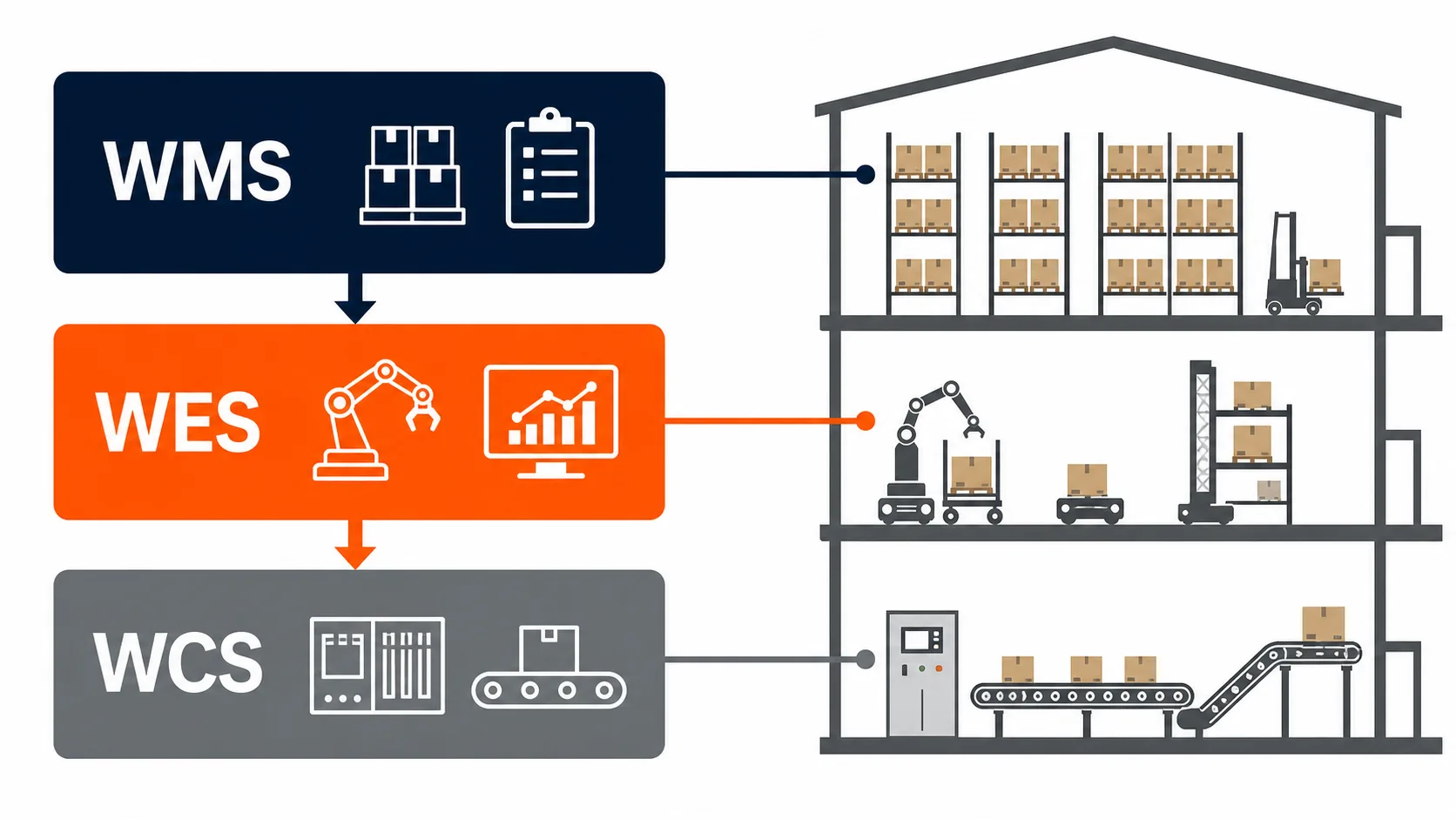
Short answer: WMS manages inventory and orders, WCS controls equipment, and WES coordinates real-time execution across robots, conveyors, workers, and automation zones. In multi-system ASRS projects, WES is the orchestration layer that turns separate technologies into one working warehouse system.
We see this pattern constantly in automation reviews. A company invests millions in ASRS hardware, installs a solid WMS, and then wonders why throughput is materially below the vendor's promise. The answer, almost every time, is that nobody planned for the orchestration layer. The robots work. The WMS works. But nothing is coordinating them as a single system.
This article breaks down what each software layer does, where they overlap, and why the WES is the piece that separates a warehouse with automation from an automated warehouse.
What Is a WMS? The Planning and Inventory Layer
A Warehouse Management System (WMS) is the oldest and most widely adopted layer in warehouse software. It handles inventory tracking, order management, and high-level work allocation. Think of it as the planning brain — it knows what is in the warehouse, where it is stored, and what needs to ship.
A typical WMS handles:
- Inventory records — SKU locations, lot tracking, expiration dates, cycle counts
- Order management — receiving purchase orders, allocating inventory, releasing pick waves
- Labor planning — assigning tasks to zones or workers at a shift level
- Compliance and reporting — audit trails, regulatory documentation, KPI dashboards
WMS platforms like SAP EWM, Manhattan Associates, Blue Yonder, and Oracle WMS have been around for decades. They are mature, well-understood, and deeply integrated with ERP systems.
Where WMS falls short: A WMS thinks in batches and waves. It releases a group of orders, assigns them to a zone, and expects humans or systems downstream to figure out the execution details. It does not make real-time decisions about which robot should pick which tote, or how to reroute a conveyor line when a jam occurs. It operates on a planning horizon of minutes to hours, not milliseconds to seconds.
For a manual warehouse, that is fine. For a warehouse running multiple types of ASRS systems with robots from different vendors, it is not enough.
What Is a WCS? The Equipment Control Layer
A Warehouse Control System (WCS) sits at the opposite end of the stack. Where WMS deals with orders and inventory, WCS deals with machines. It sends low-level commands to specific pieces of equipment: start this conveyor, move this shuttle to lane 14, activate this diverter.
A WCS typically manages:
- PLC communication — sending and receiving signals from programmable logic controllers
- Conveyor routing — directing totes and cartons through sortation systems
- Equipment status monitoring — tracking faults, speeds, and operational states
- Single-device optimization — managing the movement logic for one type of equipment
WCS is essential. Without it, your conveyors do not move and your shuttles do not know where to go. But a WCS is usually tied to a single equipment vendor or a single automation zone. The conveyor WCS does not talk to the AMR fleet manager. The shuttle system WCS does not coordinate with the goods-to-person picking station controller.
Where WCS falls short: It optimizes within its own silo. A conveyor WCS will route totes efficiently through the sorter, but it has no idea whether the downstream packing station is backed up or whether an AGV could deliver that tote faster via a different path. It lacks the cross-system visibility to make warehouse-wide decisions.
What Is a WES? The Real-Time Orchestration Layer
A Warehouse Execution System (WES) sits between WMS and WCS. It takes the high-level plans from the WMS (which orders to fulfill, which inventory to move) and translates them into real-time, optimized instructions across all automation systems and human workers simultaneously.
This is where GoASRS lives. Our WES platform was built specifically to solve the problem we kept running into as an integrator: clients had good hardware and good WMS software, but no intelligent layer connecting them.
A WES handles:
- Real-time task allocation — deciding which specific robot, conveyor, or worker handles each task based on current conditions, not a static plan
- Cross-system coordination — orchestrating AMRs, ACRs, shuttles, conveyors, and manual stations as one unified workflow
- Dynamic priority management — reprioritizing orders on the fly when rush shipments arrive or equipment goes down
- Multi-vendor robot fleet management — sending commands to robots from different manufacturers through a single control plane
- Performance optimization — continuously adjusting task routing based on real-time throughput data, queue depths, and equipment availability
The key difference: WMS tells you what needs to happen. WCS tells individual machines how to move. WES decides who does what, when, and in what sequence — across every system in the building, every second.

WMS vs WES vs WCS: Side-by-Side Comparison
Here is a direct comparison across the dimensions that matter most when you are evaluating warehouse software:
| Dimension | WMS | WES | WCS |
|---|---|---|---|
| Primary function | Inventory and order management | Real-time task orchestration | Equipment-level control |
| Decision horizon | Hours to shifts | Seconds to minutes | Milliseconds to seconds |
| Scope | Entire warehouse (logical) | Entire warehouse (physical + logical) | Single equipment zone |
| Optimization target | Order fulfillment accuracy | Cross-system throughput | Individual machine efficiency |
| Vendor dependency | ERP-aligned | Vendor-agnostic | Equipment vendor-specific |
| Handles multi-vendor robots | No | Yes | No |
| Real-time rerouting | No | Yes | Limited (within zone) |
| Human-robot coordination | Basic zone assignment | Dynamic task interleaving | No |
| Typical update cycle | Batch (minutes) | Continuous (sub-second) | Continuous (milliseconds) |
| Integration direction | Upward (ERP, OMS) | Lateral (all systems) | Downward (PLCs, devices) |

The table makes one thing clear: WES is not a replacement for WMS or WCS. It is the connective tissue between them. You still need a WMS for inventory and order management. You still need WCS-level control for your equipment. But without a WES, those two layers operate in isolation, and your automation investment underperforms.
According to MHI's annual industry report, adoption of warehouse execution systems has grown significantly as companies move from single-technology deployments to multi-system automation environments. The complexity of coordinating different automation technologies is the primary driver.
Why WES Is the Missing Piece in Most Warehouse Automation Projects
When we deploy automation for clients, the hardware installation is rarely the hard part. Bolting racking to the floor, commissioning shuttles, calibrating conveyors — that is engineering with known variables. The hard part is making everything work together after go-live.
Here is what we see in projects that skip the WES layer:
Robots working in silos. The ACR fleet handles storage and retrieval. The AMRs handle transport. The conveyor handles sortation. Each system hits its individual KPIs, but the handoff points between them create bottlenecks. Totes pile up at transfer stations. Robots wait idle while conveyors are overloaded. In GoASRS project reviews, these disconnected systems often run far below their modeled theoretical capacity until orchestration is fixed.
Manual workarounds everywhere. Without real-time orchestration, supervisors end up making the coordination decisions that software should handle. They manually reassign workers, override pick sequences, and adjust priorities based on gut feel. This works at low volume. It collapses during peak season.
Finger-pointing between vendors. The shuttle vendor says their system is running at spec. The AMR vendor says the same. The WMS vendor says orders are being released correctly. Everyone is technically right, and the warehouse is still missing its SLA. The integration layer — the WES — is where accountability for end-to-end performance lives.
Across GoASRS integration projects, we have seen warehouse automation ROI projections miss by 40% or more when the project plan treated software integration as an afterthought. In multi-system deployments, the WES layer typically represents 8-15% of total project cost. The cost of not having one is measured in years of underperformance.
How WES Works in Practice: The Li-Ning Case
Theory is useful, but let me walk through a real deployment. Li-Ning, one of China's largest sportswear brands, operates high-volume distribution centers that handle thousands of SKUs across apparel, footwear, and accessories. Their automation challenge was not a single-technology problem — it was a multi-system coordination problem.
The facility runs multiple robot types simultaneously:
- ACR (Autonomous Case-handling Robots) for bin storage and retrieval in the main ASRS zone
- AMRs (Autonomous Mobile Robots) for transport between zones
- Conveyor sortation for outbound order consolidation
- Manual pick stations for items that require human handling
Without a WES, each of these systems would operate on its own schedule. The ACR fleet would retrieve bins based on a static queue from the WMS. The AMRs would pick up totes whenever they arrived at the transfer point. The conveyor would sort whatever showed up. Peak-hour congestion at handoff points would throttle the entire operation.
With GoASRS's WES orchestrating the workflow, the system operates differently. The WES looks at the full picture: current order priorities, robot positions, conveyor load, station queue depths, and worker availability. It makes allocation decisions in real time:
- If the conveyor sortation zone is approaching capacity, the WES throttles ACR retrievals and redirects some orders to AMR-served manual stations
- If an AMR fleet segment is underutilized, the WES pulls forward lower-priority orders that happen to be in that zone, keeping robots productive
- If a rush order arrives, the WES recalculates the entire task queue within seconds, preempting lower-priority work without disrupting in-progress picks
The result, based on internal project benchmarking: the facility processed orders 35-40% faster than the pre-WES configuration, with the same hardware. No new robots. No additional conveyor lines. Just smarter coordination.
This is the pattern we see across our projects, from Sony's semiconductor logistics to Decathlon's retail distribution. The hardware provides capacity. The WES extracts performance.

When You Need a WES vs When WMS Is Enough
Not every warehouse needs a WES. Here is a practical decision framework:
WMS alone is probably sufficient if:
- You run a single automation technology (one vendor, one system type)
- Your warehouse is primarily manual with limited automation
- Order volumes are stable with minimal peak-to-trough variation
- You have fewer than 20 automated units (robots, shuttles, etc.)
You need a WES when:
- You operate two or more automation technologies from different vendors
- Your facility mixes automated and manual workflows that need to coordinate
- Peak volumes are 3x or more above baseline, requiring dynamic rebalancing
- You are running 50+ automated units that compete for shared resources (aisles, charging stations, transfer points)
- Your ASRS system needs to coordinate with downstream processes like packing, sorting, or shipping
The gray zone: If you are planning a phased automation rollout — starting with one system now and adding more later — build the WES into your architecture from day one. In our retrofit work, adding WES after multiple systems are already running with their own control logic can cost 3-5x more integration effort than including it in the original design. We have done both, and the retrofit projects are painful for everyone involved.
How to Evaluate a WES: 7 Criteria That Matter
If you are comparing WES platforms, here are the criteria we use when evaluating solutions for our own projects and recommending them to clients:
1. Vendor-agnostic device support
The whole point of a WES is cross-system coordination. If the WES only works with one robot brand, it is just a fancy fleet manager. Ask: how many robot types can it control simultaneously? GoASRS's WES supports 5+ robot types from different manufacturers through a standardized device abstraction layer. That is the bar.
2. Architecture (monolith vs microservices)
A monolithic WES becomes a bottleneck as you scale. Look for microservices architecture where individual modules (task allocation, fleet management, analytics) can scale independently. When one zone gets busy, you want to add compute to that module, not upgrade the entire system.
3. Real-time decision latency
Ask for specific numbers. A WES that takes 5 seconds to reallocate a task after a robot fault is not real-time — it is batch processing with a short interval. Target: sub-500ms for task reallocation, sub-100ms for equipment-level commands.
4. Integration depth with WMS and WCS
The WES needs bidirectional communication with your WMS (receiving orders, reporting completions) and your WCS/equipment controllers (sending commands, receiving status). Ask about supported protocols (REST APIs, MQTT, OPC-UA) and whether the integration is real-time or polled.
5. Scalability ceiling
How many concurrent automated units can the WES manage? What happens to decision latency at 100 robots? At 500? Get benchmark data, not marketing claims. A WES that works great with 30 robots and degrades at 80 is a problem you will discover at the worst possible time.
6. Simulation and digital twin capability
Before you go live, you need to test scenarios: What happens during Black Friday volume? What if 10% of robots go offline? A WES with built-in simulation lets you stress-test configurations without risking live operations. This is not a nice-to-have — it is how you avoid expensive surprises.
7. Observability and diagnostics
When something goes wrong at 2 AM during peak season, you need to understand why in minutes, not hours. Look for real-time dashboards, historical replay, and root-cause analysis tools. The WES should tell you not just that throughput dropped, but which specific decision chain led to the bottleneck.
The GoASRS Approach to WES
As a logistics integrator, we built our WES because the market did not have what we needed. Most WES products were either tied to a single equipment vendor or designed as add-ons to WMS platforms that lacked true real-time capability.
Our WES is built on three principles:
Vendor-agnostic by design. We integrate robots and equipment from multiple manufacturers in every project. Our WES treats device type as a configuration parameter, not a hard-coded dependency. When a client wants to add a new robot brand to an existing facility, it is a configuration change, not a development project.
Microservices architecture. Each functional module — task orchestration, fleet management, path planning, analytics — runs as an independent service. This means we can update the path planning algorithm without touching task allocation, and we can scale fleet management independently when a client adds more robots.
Built by integrators, for integration. We do not just sell software — we deploy complete automation solutions. Every feature in our WES exists because we needed it on a real project. The simulation module exists because we got tired of discovering configuration issues during go-live. The multi-vendor abstraction layer exists because our clients kept asking us to mix robot brands for cost optimization.
If you are evaluating automation options and want to understand how WES fits into your specific operation, reach out to our team. We are happy to walk through your layout and volume data.
Frequently Asked Questions
Can a WES replace my WMS?
No. A WES and WMS serve different functions. Your WMS manages inventory records, order processing, and compliance reporting — none of which a WES handles. What a WES does is take the work orders from your WMS and execute them more intelligently across your automation systems. Most modern warehouses need both, working together.
What is the difference between WES and WCS?
A WCS controls individual equipment — it tells a specific conveyor to run or a specific shuttle to move to a location. A WES coordinates across all equipment and workers, deciding which system handles which task based on real-time conditions. Think of WCS as the hands and WES as the brain. A single warehouse might have multiple WCS instances (one per equipment type) but only one WES orchestrating all of them.
How much does a WES cost compared to the total automation investment?
In our experience, WES typically represents 8-15% of total project cost for a multi-system automation deployment. The exact figure depends on the number of automation zones, robot types, and integration complexity. For context, the total cost of an ASRS system includes hardware, software, installation, and commissioning — the WES portion is a fraction of that, but it has an outsized impact on whether the hardware investment delivers its promised ROI.
Do I need a WES if I only have one type of robot?
Probably not, at least not immediately. If you are running a single fleet of identical robots from one vendor, that vendor's fleet management software is usually sufficient. A WES becomes critical when you add a second automation technology, mix automated and manual workflows, or need to coordinate across multiple zones. That said, if you plan to expand your automation footprint within 2-3 years, architecting for a WES from the start saves significant retrofit cost.
How long does it take to implement a WES?
For a greenfield deployment where the WES is part of the original system design, implementation typically adds 4-8 weeks to the overall project timeline. For a retrofit into an existing multi-system environment, GoASRS usually scopes 8-16 weeks depending on the number of integrations required. The longest phase is usually testing — running the WES in shadow mode alongside existing operations before cutting over.
What is the biggest mistake companies make with warehouse software?
Treating software as an afterthought. We have seen projects where the hardware budget was set, the WMS was selected, and then someone asked "how do we connect all this?" three months before go-live. By that point, options are limited and timelines are compressed. The software architecture — including whether you need a WES — should be part of the initial system design, not a late addition.
—
About GoASRS: GoASRS is a warehouse automation integrator specializing in multi-system ASRS deployments. Our proprietary WES platform coordinates robots, conveyors, and manual workflows from a single control plane. With 6,000+ robots deployed across 50+ enterprise clients, we build automation systems that work as systems — not collections of parts. Learn more about our approach or talk to our team.
Planning a Warehouse Automation Project?
Our team has delivered 50+ ASRS systems across retail, manufacturing, and logistics. Tell us about your project and we will get back to you within 24 hours.
Thank you!
We received your message and will get back to you within 24 hours.